VXDIAG Xentry Multiplerxer Failed Solved by VCI Update
Q: When do you need to update the Xentry Diagnosis VCI version?
A: Your vxdiag vcx se benz/ benz c6 IP setting is correct, the device is connected (no question mark icon), but xentry reported error 'initialization of diagnosis multiplexer failed ', shown as image below:

Solution:
1. if vxdiag benz c6 driver is well installed IN VX Manager

2). Run Xentry VCI Recovery program on the desktop, and check if xentry software version matches the Xentry VCI version (i.e 06/2021 xentry matches 2021.06 VCI version).
Press Update to update VCI until finished.
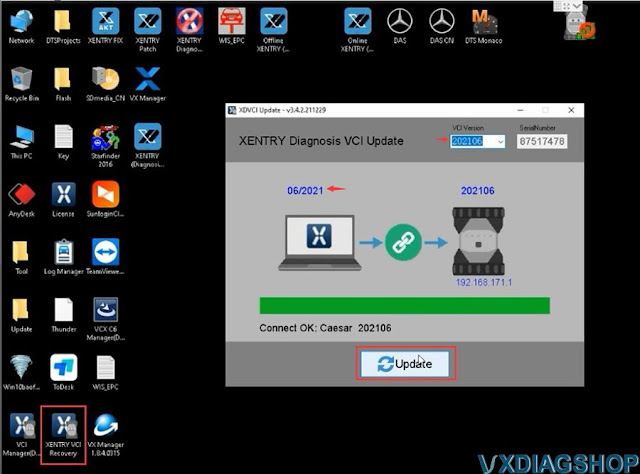

NOTE: If your xentry reported multiplexer failed error and device cannot be detected (with a question mark), check if Benz driver is installed, update C6 VCI and DoIP firmware.
How to Change VXDIAG HDD Tampered Browser Homepage?
I got the JLR Pathfiner HDD for the vxdiag vcx se jlr interface. Why does it default all my web browse to a Chinese page?
I removed and reinstalled browser and it’s same. How do you get rid of it.
.jpg)
The solution to the tampering of the browser homepage:
The solution can be applied to all VXDIAG 500GB, 1TB, 2TBsoftware HDDs.
Here is an example of Google Chrome browser. Other browsers should be the same.
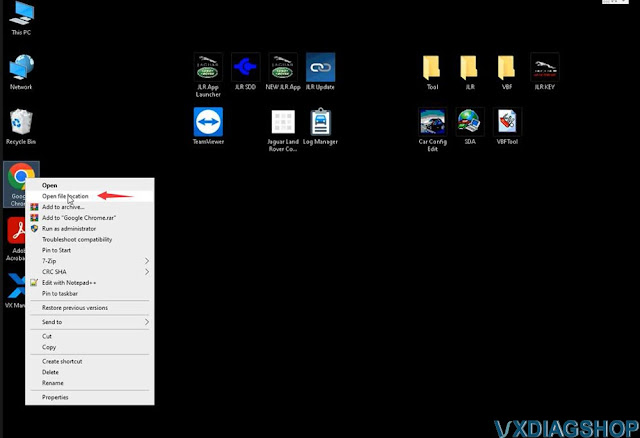
Right-click Google Chrome browser on desktop andOpen file location
Delete Google Chrome desktop short cut
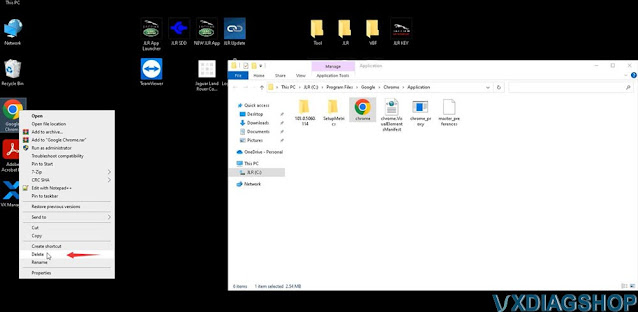
Rename the name of the browser in the root directory, i.e renamechrometogoogle chrome (or any other different names)
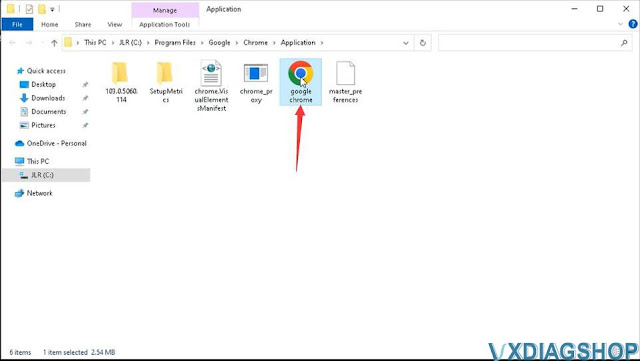
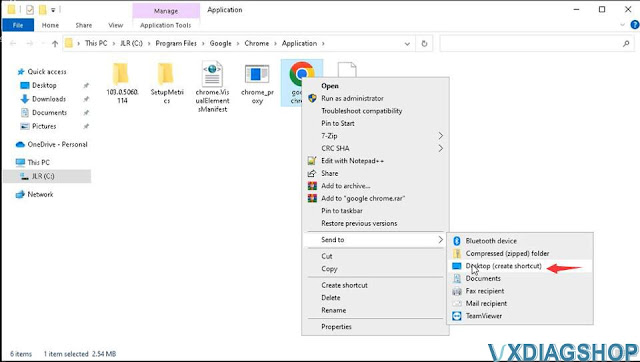
Send the renamed browser to desktop to create a shortcut
Run new Google chrome shortcut from desktop

Your web browser homepage will be restored.
https://www.vxdiagshop.com/service/solve-vxdiag-hdd-default-web-browser-to-chinese-page.html
How to configure Monaco 8.16 to use VXdiag vcx se benz doip?
Question: Does anyone have Monaco 8.16 config to use VXdiag vcx se benz doip? I can get the VXDIAG to work over CAN bus but not DoIP. I don't show or can't select the same D-PDU API version? Is there something I'm missing?
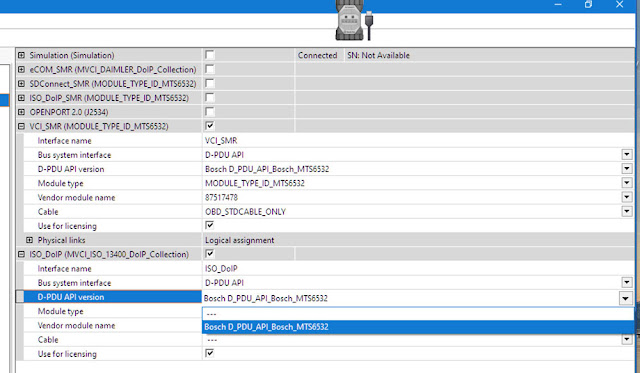
Solution:
Do the following settings:
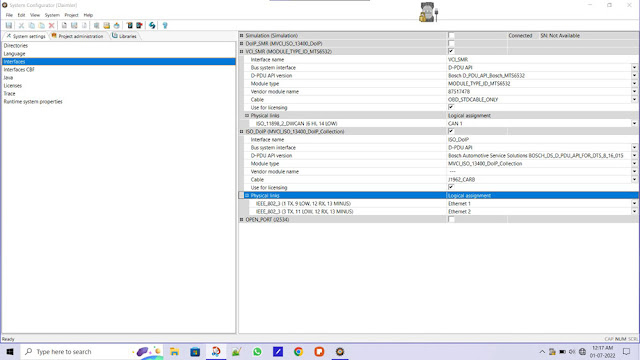
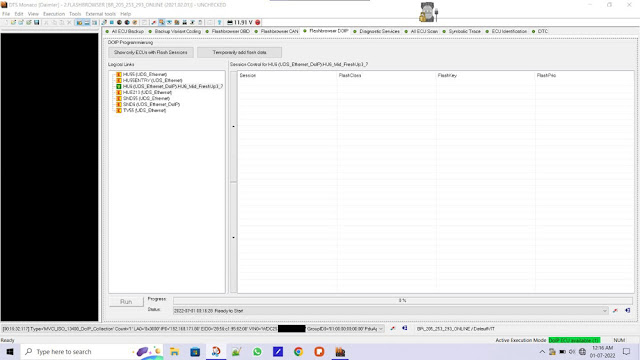
Check if DTS version is 8.1.6.15.
If it's 8.16.15, check is your DTS software is installed with complete Addons.
If no then you got to get proper DTS 8.16 and installation files.
Check step-by-step configuration guide here: How to set up DTS Monaco 7.1.6 with VXDIAG VCX SE
Free Download V126 Ford Mazda IDS for VXDIAG
Allscanner VXDIAG Ford and Mazda software new version V125 released on July 5th, 2022.
Software version:
Ford IDS V126.01
Mazda IDS V126.01
Support Online programming, we don't provide online account
Device affected: vxdiag vcx nano ford/mazda USB version, vxdiag vcx nano ford/mazda WiFi version, VXDIAG VCX SE Pro, VXDIAG Full, VXDIAG VCX Plus 3 in 1 etc
Operating system: Win7, Win8 and Win10
Attention: Mazda and ford ids must be installed on different operative systems. On the same computer but on different windows(dual boot) only. Or on different computers
Free download Ford IDS V126
https://mega.nz/folder/6dwzgaJR#XW2q1xPdbgKV4XtZQqkB0w
File including:
IDS-126.01_full.exe
VCI_Software_1.0.0.10.exe
VX Manager
1.8.9.0601.exe
Free download Mazda IDS V126
https://mega.nz/folder/iQp1UACZ#d4ey2cWHmaEMf9n2dTcTAQ
File including:
IDS-126.01_full.exe
VX Manager 1.8.9.0601.exe
Free download Ford and Mazda IDS Patch
https://mega.nz/folder/OV4RRC6B#seCWP6UCzOPWEDYlQxZ1iQ
ford ids native install languages: Chinese (traditional, simplified), Czech, Danish, Dutch, English, Finnish, French, German, Greek, Hungarian,
Italian, Japanese, Norwegian, Polish, Portuguese, Romanian, Russian, Slovenian, Spanish, Swedish, Thai, Turkish
Ford IDS Installation:
1. Install Ford IDS-1**
2. Wait for the installation of Ford IDS – 1**,
and restart the computer
3. Install the Ford original VCI software_
1.0.0.10.exe
4. Install VX manager and Ford IDS driver
5. Wait for VX
manager and Ford IDS driver installation to complete
6. Connect VCX device
and install idspatch
7. Use idspatch to open IDs and start diagnosis.
Mazda IDS Installation:
1. Install mazdaids-1**
2. Wait for mazdaids – 1** installation to
complete and restart the computer
3. Install VX manager and Ford IDS
driver
4. Wait for VX manager and Ford IDS driver installation to
complete
5. Connect VCX device and install idspatch
6. Use idspatch to
open IDs and start diagnosis.
Solve VXDIAG ODIS 9.1.0 license invalid
Problem:
I failed to load ODIS 9.1.0 engineering v14 software for the vxdiag vcx se 6154. It says license invalid.
‘Error reading the license file: NoteAfter Wed
The License is invalid’
.png)
VXDIAGSHOP Solution:
License is expired.
Change the computer date/time to the date before the current date, i.e year 2021.
Then register with the Engineering V14 here
https://mega.nz/file/muZnBLrY#J-46yUAkRMIgkpREUeoULnI9tEsy6cO-VYR6HpqjdMc