Free Download Honda HDS 3.103.048 for VXDIAG
HDS (Honda Diagnostic System) software version V3.103.048 is verified working with vxdiag scanners (vcx pro for Honda, vcx plus for Honda, vxdiag full etc).
Version: HDS 3.103.048 + I-HDS 1.005.048 + J2534 Rewrite 1.00.0034 + Immobilizer Setup Tool 1.3.9
Operating System: WinXP, Vista, Win 7, WIN8, WIN10
Language: English Chinese Spanish French Korean Portuguese Indonesian
Year: 2020
Date of update: 2020
Free Download Honda HDS 3.103.048 Software Torrent
https://mega.nz/folder/2QpWgATI#rYNeXcLKIqGfZY1XZya_Kg
File including
HDS software 3.103.048
Honda Extension 1.0.33
i-HDS 1.005.048
Immobilizer Setup Tool 1.3.9
J2534 ECU Rewrite: 1.00.0034, Build Date: 02/19/2020, Calibration File Count: 2096

*The HDS software here does not test with other Honda VCIs, you are at your risk.


Honda HDS functions include:
•DTC reading and clearing
•Snapshot function (capture data relative to a trigger event)
•Vehicle data display (value, line graph, or bar graph formats)
•DLC locator diagrams
•Data list display (real-time display of ECU parameters)
•Onboard tutorial
•Generic scan tool runs basic tests on non-Honda/Acura vehicles (HDS Tablet and Pocket Tester only)
•Control module update functions (HDS Tablet and Pocket Tester only)
Honda I-HDS replaces HDS. To diagnose newer cars, I-HDS is required. The interface is easier to use. So you need to install HDS first and I-HDS afterwards.
The J2534 Rewrite software allows you to update powertrain modules such as PCM and TCM.
Test coverage: Dynamical, Body, Chassis, ABS, SRS, Anti-theft, etc. HDS supports CAN BUS system, and it can program key and re-program the Auto ECU.
VXDIAG VCX SE BMW No Device Cannot open ISTA Solution
Problem:
I got the vxdiag vcx se for BMW with HDD. When i connect the vcx se with laptop and vehicle, the power, wifi indicators turn on, computer icon light turns on and flashes, then goes out. Vehicle indicator turns on.
VX Manager did not detect the vcx se bmw, saied no device connected.
I tried to run ISTA+ software, it showed nothing but blank. Any idea?


Solution:
If VX Manager does not detect device and show information, you can not run any vxdiag software.
Download and install VX Manager driver again.
http://www.vxdiag.net/managecenter/download/vxdiag.zip
Review VXDIAG GM on Windows 10 Pro USB 2.0 Port
Here’s the VXDIAG VCX NANO GM GDS2/Tech2Win working experience on Surface Pro (Windows 10) tablet:
“I tried on three of my Surface Pro 2017 models (Windows 10 Pro) Everything would work except the Tech 2 software. CANDI not connected. Not matter what I tried. When launching Tech2 the popup to choose connection to the MDI wasn’t appearing. I looked everywhere for the usb drivers with no luck.
After messing around a couple days with it, I got it to work with another laptop running Windows 10 Pro.
I think the problem is that the Surface Pro runs a usb 3.0 port and the other laptop has a 2.0 port. So if you only have a 3.0 port you may run into issues. A possible workaround would be a usb port splitter that supports usb 2.0. I haven’t tried this because I didn’t have one on hand.
The winning combination for me was:
1. USB 2.0 port on pc
2. Windows 10 Pro
3. Latest version of VX Manager from vxdiagshop I think it was 1.6xxx
4. Latest downloads for the GD2 folder & tech 2 folder from vxdiagshop.com
5. Didn’t use anything from the CD in the box
6. When installing Vx Manager I did tick the boxes for pass-through and GDS2 / Tech2Win and SPS.
7. Installed all three software programs
8. Plug in the module to the pc (doesn’t need to be connected to car)
9. Run VX Manager and the module should show up. Update firmware on module itself.
10. Hit the automotive tab on the left and verify pass-through and GD2/Tech2 (and SPS if you need it) have green checks on them. If not double click to open them and install / update if necessary.
11. Leave the VX Manager running – minimize it if you want to.
12. Double click shortcut on desktop to launch Tech2Win
13. Choose North America
14. Choose MDI interface – not MDI2
15. Next dialog box pick the only choice there is to choose from.
16. Tech2 should run fine. Splash screen on startup will show CANDI unit connected.
https://www.vxdiagshop.com/service/set-up-vxdiag-vcx-nano-gm-on-windows-10-pro.html
How to solve VXDIAG VCX NANO Firmware Update Failed?
Problem:
My vxdiag vcx nano volvo interface has got quite old version firmware 1.5.1.0 as i see the latest goes to 1.6.6.0. I tried to update the firmware but it failed me and reported an error “Firmware update failed”. Device was connected and communication indicators turn on. Any idea?


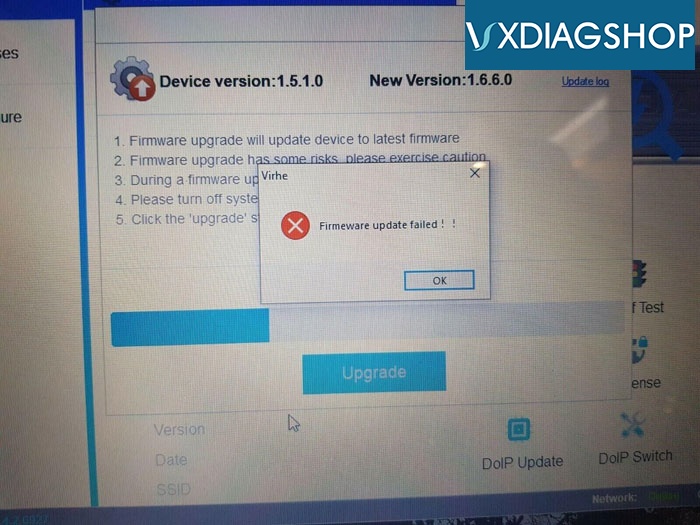
Vxdiagshop solution:
Firmware version is too old to directly update to latest version.
First download firmware file 1.5.2.exe and install.
https://mega.nz/file/SnA30Kxb#2Jb9G6btO1WG3OQ5b8HJ8nUWgK-I020Y8wChvfo8eWI
Then update firmware from 1.5.2 to latest version.
*The solution can be applied to all vxdiag scanners with older firmware version than 1.5.2.
How to Solve VXDIAG Ford cannot find device error?
Problem:I downloaded VXDIAG VCX NANO Ford IDS and patch files then tried to open patch and this comes up
"Error Failure, try again: 3"

Then i followed your advice to delete IDS patch file, then download to try again. I have antivirus and firewall disabled as well.
But still struggling to get ford ids working
I downloaded and installed the software you sent.
but I cannot get the patch to open, I get the error message attached
"cannot find device"

Vxdiagshop.com Solution:
Engineer says that you did not connect vcx nano device, or you did not install driver well.
Only when the device been recognized , you are able to run the IDS software.
Feedback:
Connected vxdiag ford device and all works well !!
Thank you again !!!