How to Program key fobs using vxdiag vcx nano?
How-to: program key fobs using a vxdiag vcx nano for gm and Tech2win software.
Model sample: 2007 Saturn Ion2
Credit to Mr.GENMOTMAN.
Purpose: Program Key Fobs
Tool used: VXDIAG VCX NANO GM and Tech2Win
Procedure:
Insert VCX NANO and run VX Manager Software,
Turn ON the ignition with the engine OFF
Run Tech2Win program as per VCX NANO instructions
Click “Enter”
Main Menu > F0: DIAGNOSTICS

Vehicle identification

Vehicle identification – Product Type > Passenger Car

Vehicle identification – Product Make > (8) Saturn

Vehicle identification – Product Line > A

Diagnostics > F1: Body

Body > F0: Body Control Module

Body Control Module > F2: Special Functions

Special Functions > F0: Program Key Fobs

Body Control Module > F0: Program Key Fobs

Once learned, the Tech2win will let you know if it passed or failed!
https://www.vxdiagshop.com/service/vxdiag-tech2win-program-key-fobs.html
VXDIAG VCX SE BMW ISTA-D 4.24.13 Software List
Good news for sharing, VXDIAG VCX SE BMW Software 500G HDD with ISTA-D 4.24.13 ISTA-P 3.67.100 has been released in www.vxdiagshop.com.
Software Version:
-For BMW ISTA-D 4.24.13 (Diagnostic);
-For BMW ISTA-P 3.67.100 (Programming);
-For BMW Group ISPI (the fourth generation of For BMW diagnostic software client);
-E-SYS (Engineer Software for F series, available for programming, coding, Chinesization, realize hidden functions, advanced features);
-WINKFP (for E series: programming, upgrade and downgrade);
-Tool32 (enter key, import codes, delete certification, advanced features for BMW series);
-INPA (read vehicle information, diagnosis, read and clear trouble codes);
-For BMW Coding (for E series: import data, change the code or realize hidden functions);
-KSD2 (offer full vehicle repairing information for diagnosis or programming);
-NCS-Expert tool (for E series: set codes, realize hidden functions and change settings);
Supported languages:
English, Chinese, Czech, Dutch, French, German, Indonesian, Italian, Japanese, Korean, Polish, Portuguese, Russian, Spanish, Swedish, Thai, Turkish
Supported system:
Complete with its own system, used for the hard disk
Supported models:
BMW Cars, Rolls- Royce, Mini Cooper from 2004 to 2019
VCX SE BMW Software display:
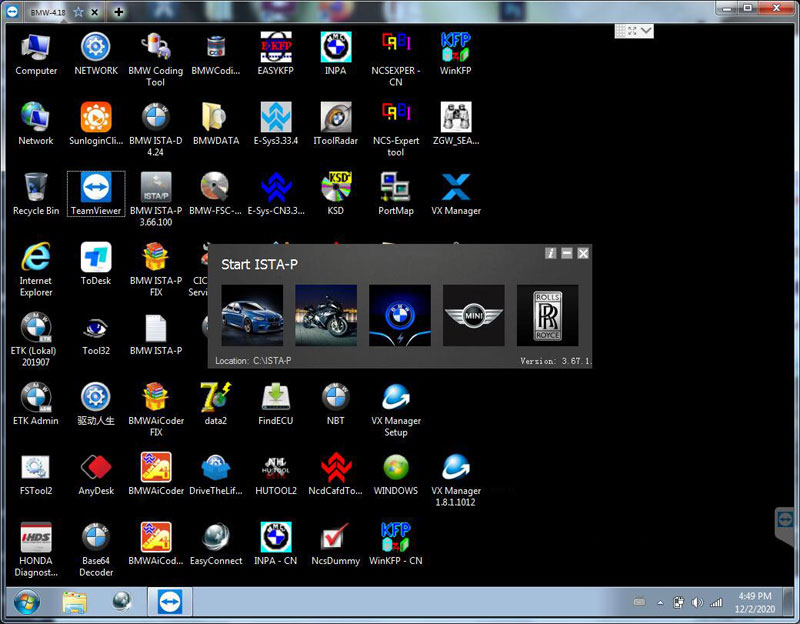


| No. | Software Name | Software Function |
| 1 | ISPI-NEXT Admin Tools | ISPI-NEXT authorization software |
| 2 | ISPI Admin Client | ISPI-NEXT authorization management and environment Configuration software |
| 3 | ISTA-D(Rheingold) | Diagnostic and repair guide, including Diagrams and disassembly Figure |
| 4 | ISTA-P(ISSS-NEXT) | Programming and coding software system |
| 5 | HDD-Update | Navigation software upgrade back-office services (function with ISTA-P, need to Import map files) |
| 6 | KSD | Work software |
| 7 | ETK | Accessories Catalog |
| 8 | E-SYS | Engineer Software for F series (available for programming and coding) |
| 9 | WINKFP | Engineer Software for E series, for programming |
| 10 | NCS-Expert tool | Engineer Software for E series, for coding |
| 11 | INPA | Engineer Software for E series, for diagnosis |
| 12 | Tool32 | Engineer Software for E series, able to run directly |
| 13 | BMW Coding Tool | Auxiliary Software of Engineer Software for E series (Available to import model data to WINKFP and NSC) |
| 14 | NcsDummy | Auxiliary Software of Engineer Software for E series (Available to modify NCS data) |
| 15 | IToolRadar | Used to recognize ICOM, activate or release ICOM Port |
| 16 | EasyConnect | Used to Configure the Environment Parameter of Engineer Software for E series, can activate or release ICOM Port |
VXDIAG VCX NANO GM T2W Win7 32bit Setup Tip
Ever since VXDIAG VCX NANO for GM / OPEL came to the market, Vxdiag has received a myriad of user reviews. And some are selected in this post. Now, let’s read them one by one.
The moment when I received VXDIAG VCX NANO for GM / OPEL that was purchased from www.vxdiagshop.com, I was quite impressed by its good quality box, which included a long USB cable, VXDiag VCX NANO for GM as well as a Diver CD. Here is what I got:
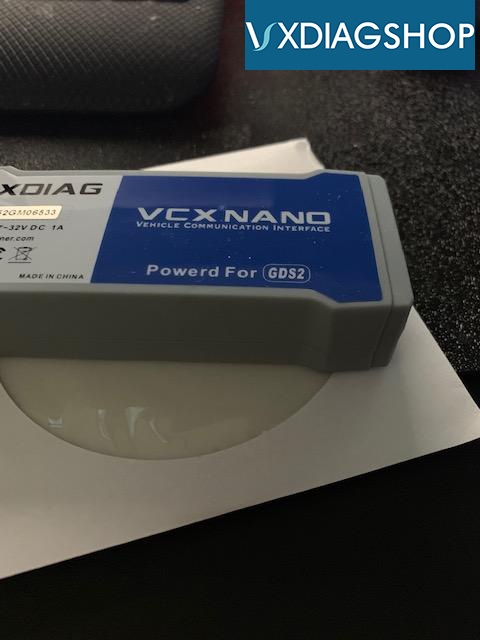
When I got it, it took me a couple of hours to figure out how to install the program correctly and learn the functions of the Tech2WIN program that comes with it. You have to follow the directions exactly on the VCXDIAG website on how to install the software and firmware. A tip is to use the CD of programs it comes with to install everything, rather than going to the website and getting the updated programs. I found that if you use the updated VX Manager program from the website, you will have a problem with TECH2WIN finding the VxDiag NANO module to use. I installed this on a Windows 7 32Bit laptop that I have for just vehicle programming and diagnostics for all my vehicles. I have read that it works with Windows 10 64Bit, but I cannot speak on this. Once I got it working I could use the TECH2WIN program to read all the modules on my truck, even the BCM that the dealer could not read. I realized the RCDLR was bad and bought a new one, but it needed to be reprogrammed to the BCM.
VXDIAG’s suggestion:
When it comes to Tech2WIN installation, you’d better use the CD of programs it comes with to install everything, instead of resorting to the website and obtaining the updated programs.
Hopefully, this post can help you.
VXDIAG Benz C6 Login in Progress Error Solution
Problem:
My VXDIAG Benz C6 device keeps saying “login in progress!” after entering Benz online programming account, any idea how to solve this lockup issue?

VXDIAGSHOP Solution:
The Benzaccess program has expired. Contact vxdiag engineer to renew.
Feedback:
Right now he installed benzaccess that resolve lockup issue.
VXDIAG, GM vs. TECH2 vs. MDI Clone
Since this come up on which device to buy, thought that I would do a quick write up of the three.
Starting with the Tech II clone, it just that and will do what the real Tech II will do. Hence diagnostics through the tool, and be be used for programming with either TIS2000 or AC Delco TDS with the tool set in pass through mode.
The downside of the clone tools is the knock off DC to DC converter, which tends to burn itself out in a short time. You can replace the converter board on the tool, and the converter itself is not that expensive.
The MDI clone is a copy of the GM MDI 1, not the MDI 2 that’s transfers data at a much faster rate. On the MDI 1 clones, they all have the serial number, and again, work just like the GM MDI. The downside to the clone MDI, is that it really wants you to have a working account, since it does not have legacy drivers to step it back to work with say most of the cracked software like the Nano. So when using the MDI clone, you will be using real GM Software from the most part/limitations of the GM software without a working account.
Now on the VXDIAG VCX NANO for GM. Although its really just a mdi clone to start with, it does have the legacy type drives that allows it to run the cracked software that you would use with a Tech 2. Hence the device will come with a cracked version of Tech2win that adds the needed tweaks To GM MDI that will allow you to use it with the cracked Tech2 , cracked VM TIS2000 that you will build a pass through driver, and then also works for VM GDS2, and AC Delco TDS (using it’s own VX drivers, and not the Bosch MDI/Tech II drivers that TDS will be offered that you do not want to install with the Nano device.
The clone MDI in a nicer unit than the nano since it has a better cabling system, but it about $100 more than a GM Nano, which is just a clone MDI as well.
The Tech II clone is not bad, and I use it some times when I have limited space in the car for fast work, The downside right away, it does not work with the newer GDS2 software, so limits it use for cars older than 2013. Also, keep in mind that the DC to DC converter is going to go south at some point, so plan on buying the better converter chip and replacing it at some point.
The VX GM Nano on the other hand, is much cheaper than a Tech2 clone. You do have to use the software for it on a laptop, but that’s not a bad thing for us older guys that wear cheater glasses to begin with. Now the real pro here, it works with Tech2win, Tis2000, GDS2 and acdelco TDS for all the vehicles up to the current year. Plus, when you are running VM GDS2 with the shell having internet access for DTC’s, will bring up a internet page of better descriptions of the problem to help you trouble shoot the problem even faster.
Take it one step farther, the Vxdiag vcx pro three in one device is a very good unit since the price include any three of the software packages to start with. So if you have a GM, the wife has a Ford, and the kid has a Toyota, the price is not too bad at add them at at later date and comes with the needed software as well.
The Nano running Tech2win and the Tech II can work withing the firmware settings, but not modify the firmware itself in a fashion that is against the firmware functions.
With the use of either TIS2000, or TDS, you can reflash the stock firmware back in, but that is about it.
Hence lets say that we are trying to turn off the TPMS system, and it not something that can be done with either a nano running tech2win or a tech II. To pull this one off, we would need to mod the firmware file itself, then flash that in with Tis2000.
Will note, when you are firmware flashing with Tis2000 or TDS, you have one of two options. In normal mode, your given a list of firmware file for that vin number that you can select the needed one.
In cases like the upgrade F55 option file that GM sells for the C7, instead of that file being in the normal list, you select the special file option, and will input the special file number that was written for your vin to flash it in instead.
As for the special firmware file you modded to say shut the TPMS system off, it a little more completed since we need to tie that file into your vin in TIS2000 so it will show up in the list to flash instead.
Simply, it not going to allow you modify the firmware in a fashion that HP tuner or EFI live will in regards to the ECM engine tuning.
https://www.vxdiagshop.com/service/vxdiag-vcx-nano-gm-vs-tech2-clone-vs-mdi-clone.html