Solved! VXDIAG VCX NANO SDK Errors
Problem 1:
I bought your vxdiag vcx nano for Ford IDS installed on a laptop three months ago. Ask me to update the SDK! What should I do ? Can you solve this via TeamViewer ?

Solution:
Install or update latest version VX Manager;
Run VX Manager, click “Firmware” to update, click “Restart” and “Update License”;
Then install Ford VCI driver
https://mega.nz/file/GZ42CLIb#qGQTp4IX7Vq5S1vNokuqqpNdMNz6SB0O-HGFA6rDMXM
Problem 2:
My vxdiag vcx nano gm used to working no problem. It gave me error SDK GetProAddress today. Any idea?
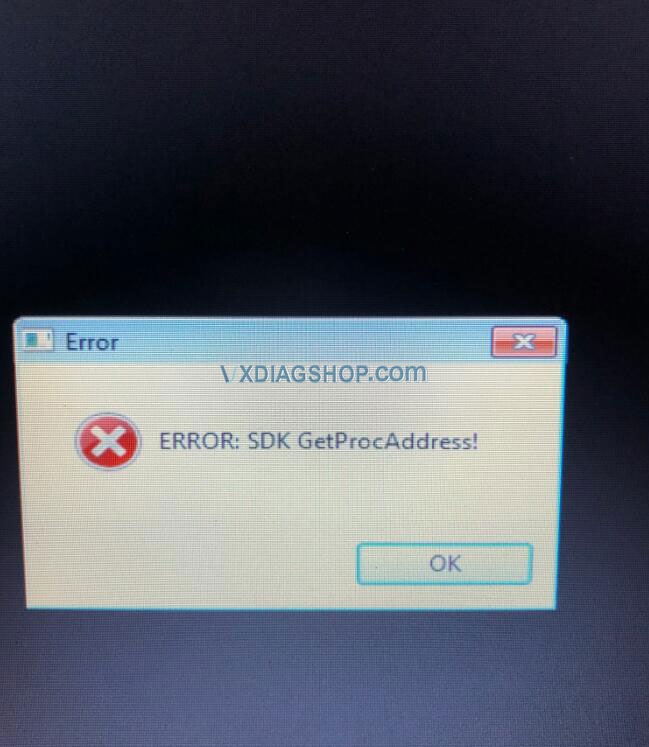
Solution:
Reinstall the new vx manager, connect vcx nano to laptop, enable network connection.
Run vx manager, click “firmware” to update.
Then click “Restart” and “Update License”
Finally install GM VCI driver here
https://mega.nz/file/7ExUTB4T#w7DFUvy8xFEBM7QcvJiHLrXExMrmEI8-Oo2WKGsDkKc
Feedback:
Thanks, everything is working properly again.
In sum, here’s the common solution to vxdiag vcx nano series SDK errors:
- Update vx manager to latest version
- Update firmware and license
- Install special VCI driver (i.e Ford VCI driver, GM VCI driver)
VX Manager and drivers can be downloaded free on www.vxdiagshop.com “Download” area.
How to install Original IDS V120 with VXDIAG VCX NANO Ford?
Latest original Ford IDS V120 software has been tested with VXDiag VCX NANO for Ford. Here’s the customer solution to IDS V120 installation and activation in Windows 10 64 bit.
Disclaimer:
At present, we only provide VXDiag Ford IDS V119 version and patch which does not need activation.
Original IDS V120 requires activation. We don’t provide software v120 nor activation. Just for sharing purpose.
Vxdiagshop will not be responsible for any problems caused by installation.
- Refresh the desktop.
- Click IDS button and choose “Run as administrator”.
- Set the language of IDS, then the Installshield Wizard will prepare the setup.
- Click “Yes” to proceed the process, then the Installshield Wizard will begin to install IDS on your computer, click “Next” to continue.
- Accept the terms of license agreement and select the destination drive.
- Click “Install” to begin the installation, then IDS will configure your new software installation, ActiveX controls will be registered, the database will be updated.
- Run VCI software as administrator, and VCI software will be set up automatically.
- When VCI software installation is finished, exit.
- Click “IDS” button and choose “Yes, this program worked correctly”
- Select VCI type, say, “Ford-VCM-II” and “VCM I and VMM”, and click “OK”
- Choose “Dealer Type”, say, “Non-dealer” and the country, say,“INDIA”.
- Obtain and activate license.
- When it prompts: “Enter the activation code to activate your license”, click “Cancel”.
Done.
http://blog.vxdiagshop.com/2020/12/18/vxdiag-ford-ids-v120-installation/
VXDIAG VCX NANO Ford F250 Testman error
VXDiag engineer offers the solution to VXDiag VCX NANO for Ford / Mazda IDS 2 in 1 Diagnostic Tool “Testman error. Record these numbers: 12 56 258930”.
Customer problem:
Having installed Win7 x64, I followed the instructions of the DVD and disabled the antivirus software. Opening VXDiag VCX NANO for Ford IDS, I’ve read out VIN number and the vehicle information (what I connected was 2005 Ford F-250 6.0). But it got stuck in “network testing”. After a while, I got an error as follows:
“Testman error. Record these numbers: 12 56 258930”

I attempted to restart, update VX Manager and the firmware and tried to work IDS 119 patch. But in vain. How to solve this problem?
VXDiagshop engineer replied: VXDIAG VCX NANO Ford does not support Ford F series Pickup vehicle produced before 2010. Most new F-series heavy duty should be troubleshooted by the new FRDS software.
How to fix VXDIAG license need to renew error?
Problem:
Hello to you, I am looking for a solution to my problem if you can help me please, I have a vxdiag vcx nano vw with serial number N52VA12*** with a license that expires on 12/31/2020, givingg error “Your device needs to renew your license”, how to renewed it? And I would also like to know the other expiration date shown in the photo what is it (02/03/2021)?


Vxdiagshop.com solution:
If vxdiag prompts renew license error, it is because the vx manager version is too old, cannot update directly, you can download newest vx manager (1.8.1.1012 Dec. 2020 version) here to install again for every software system.
https://mega.nz/file/vUAGyDxS#D0VWizy3huB8nK8dtL1FIPgfhMrJGo-isxAjirSlKjg
After install, connect your PC to network, connect the vxdiag device to PC, click “Firmware” to update firmware and firmware doip to newest. After finish, please click “Restart”, then click “Update license” to renew.


The other expiration date should be 31/12/2030

How to Solve VXDIAG VCX NANO Toyota Patch error
A question from a customer:
I bought a VXDiag VCX NANO for TOYOTA from www.vxdiagshop.com. Having quite the issue. I can load and run Techstream ok and I can load and run VM manger ok but it will not run the TS patch. I can download the patch but it will not run from the disc it just puts up a black box with the Toyota insignia.
I download TS Patch from the website when I go to run it it than says CONNECT DEVICE. I connect the OBD device and then it still will not load just says ok to use device drivers updated. It never puts the Patch folder on the desktop. How do you install the TS PATCH?
VXDiag solution:
For the Toyota patch, it is named as “Toyota Launcher”, you can download here.
https://mega.nz/file/CZZiCBzT#MMaimCKnTF-FHZLCy3C5QCh7j-5Srkso_mfJsMzqzGA
Before you download, please close antivirus and windows defender, otherwise, it would be deleted.