VXDIAG VCX SE 6154 and SVCI 6154 Which is Better?

VW Audi OBD2 diagnostic scanner VXDIAG VCX SE 6154 and SVCI 6154a which is better?


Item

SVCI 6154a

VXDIAG VCX SE 6154


Software

ODIS 8.2.0 and up

ODIS 7.1.1 and ODIS 8.2.0

Optional ODIS 9.1.0

Car brands

VW Audi Skoda Bentley Bugatti Lamborghini

VW Audi Skoda Bentley Bugatti Lamborghini

CAN FD protocol

Yes

No

DoIP protocol

Yes

Yes

KWP2000 protocol

Yes

Yes

UDS protocol

Yes

Yes

CAN BUS and K-line

Yes

Yes

Compatible with original software

Unknown

Yes

Platform/Driver

SVCI 6154 Device Manager

VX Manager

Connection

WiFi, LAN, USB

WiFi, USB, WLAN, Type C to USB

Remote diagnosis

Yes

Yes, Donet license for free

Compatible with ODIS 8.2.0 and above

Yes

Yes

Compatible with ODIS Engineer V14 and above

Yes

Yes

Support online functions

Yes, with online account

Yes, with online account

Firmware update

Yes, OTA firmware update

Yes, update online

Software update

By link

By link or HDD

J2534 passthru

Not tested

Yes, can be used as j2534 passthru for other OEM programs

License

No, single brand

Allow to add multi software license to the device, Benz, BMW, Porsche, GM, Ford, Honda, Toyota, Subaru, Volvo etc

Price:

$169

$166


In sum:

The advantage of the VXDIAG VCX SE 6154A is it can be configured for BMW, Mercedes, GM and multi brands and can be used as j2534 passthru for multi OEM software.  VXDIAG support is better and it supports latest ODIS 9.1.0.


The advantage of the SVCI 6154A is that the driver connection is faster. Latest ODIS 9.1 support. S/N can be changed belonging to the original interface. Can be used for online activation, such as immo, open component protection, but for flashing too slow, data transfer often fails if the flash file is large. It is compatible with odis 8.2.0 up, it is not working properly with odis 6.2.0 or 7.2.1.

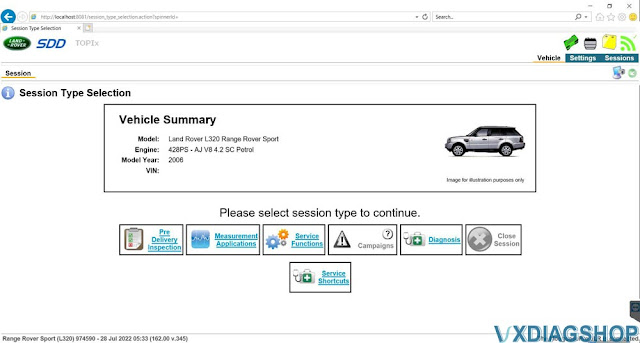
Land Rover L320 06 Configure Ride Control Module by VXDIAG SDD

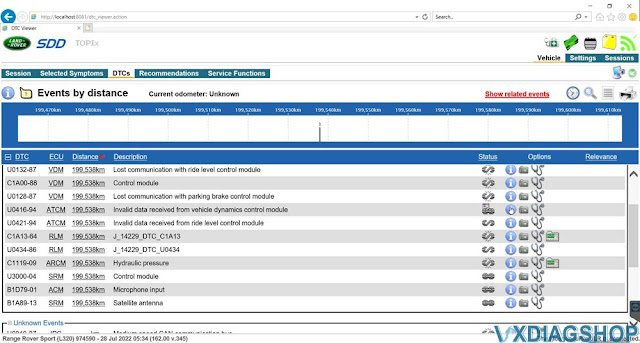
2006 Land rover Range Rover Sport L320 having issues a suspension fault U0132-87 error which my vxdiag vcx se jlr sdd diagnostic tool reads as "Lost Communication with Ride Level Control Module (RLCM).  This is accompanied by the usual orange suspension light and and several other related faults on the scanner.

The Control Module requires to be recalibrated/programmed to the new component even if its the same model compressor.
New compressor = New programming no matter what.
The recalibration was not that expensive (with SDD online subscription).

You need to replace the suspension air compressor and reconfigure the ride module after replacing it.


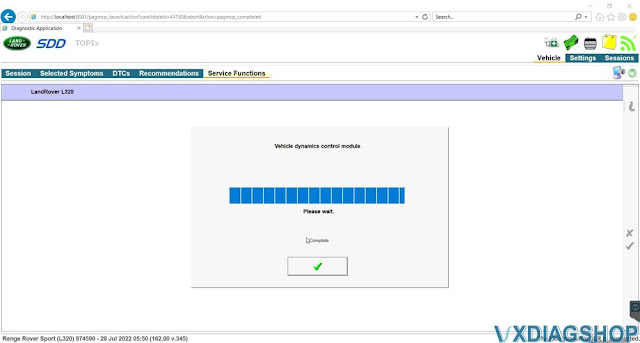
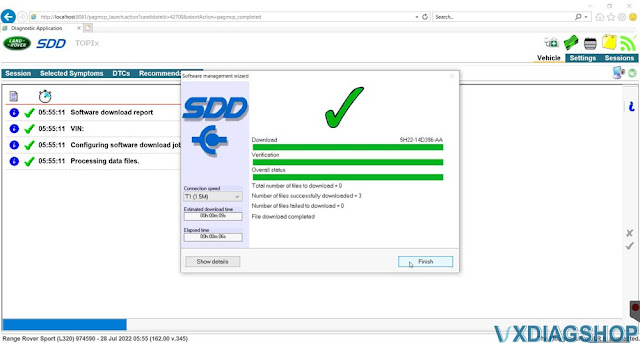
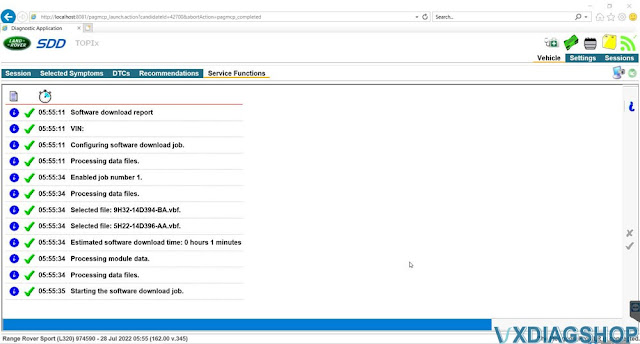
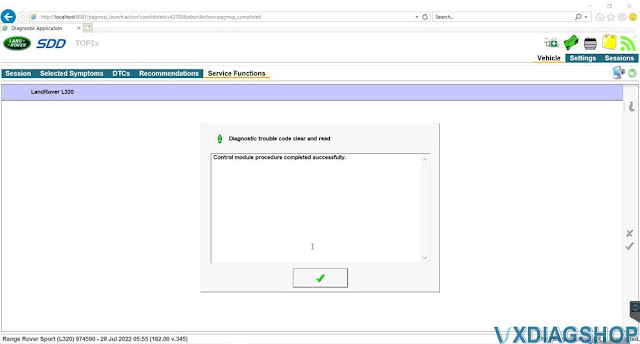
Configuring a new ride level control module is done with the latest JLR SDD V162 online via VCX SE J2534 passthru device.

Now All the other codes are cleared.

Land Rover L320 06 Configure Ride Control Module by VXDIAG SDD 1

Land Rover L320 06 Configure Ride Control Module by VXDIAG SDD 2

Land Rover L320 06 Configure Ride Control Module by VXDIAG SDD 3

Land Rover L320 06 Configure Ride Control Module by VXDIAG SDD 4

Land Rover L320 06 Configure Ride Control Module by VXDIAG SDD 5

Land Rover L320 06 Configure Ride Control Module by VXDIAG SDD 6

Land Rover L320 06 Configure Ride Control Module by VXDIAG SDD 7

Land Rover L320 06 Configure Ride Control Module by VXDIAG SDD 8

Land Rover L320 06 Configure Ride Control Module by VXDIAG SDD 9

Correct Mustang Speedmeter with VXDIAG & Forscan

Tutorial: How to correct Ford Mustang Speedmeter (if your car is just off from the factory or you've changed tire sizes) with Forscan and VXDIAG J2534 passthru.


What's required:

A laptop running Windows

Free Forscan software with a free extended license

OBD scanner that works with Forscan ((VXDIAG VCX NANO Ford, VCX SE pro or other J2534 passthru))

How does it work?

For 2015-2019 Mustangs, Ford programs the tire size of the car on BCM line 726-12-01 in the second four-digit block of hex. For 2020+ Mustangs, it's split between 726-15-01 and 726-15-02 as described below. It's stored as the nominal circumference of the driven wheel in millimeters with a revs/mile conversion factor of 96.7%. To save you the trouble of doing a bunch of math and conversions between decimal and hexadecimal, I've come up with a hex calculator that you can use here: click here

This is covered in the spreadsheet, but for example my 2017 GT PP currently has this in the BCM as-built:

726-12-01 xxxx 0858 xxxx

If I changed my rear tires to 305/35R19's, my calculated value is this:

726-12-01 xxxx 0843 xxxx

The x's mean to leave whatever value is already there.

2015-2019 Mustangs share the 726-12-01 address. For 2020+ Mustangs, the location has changed to this:

726-15-01 xxxx xxxx ABxx
726-15-02 CDxx xxxx xxxx

ABCD = your calculated value. It's split between the two addresses for 2020+ cars.

You also have two options here. You can simply enter the size of your current rear tires as in my example above, and using the nominal diameter of that tire size the calculator will give you a hex value you can program to get pretty close (maybe even dead on) with the speedometer. Tire manufacturers vary of course, and your car's speedometer may be a little weird. So below the tire size calculator is a truing calculator that relies on a precise measurement from GPS.

As stated in the calculator, I recommend that you use a GPS that can output in tenths of a mile per hour, that you set the cruise on level ground as high as reasonable (eg 75mph) and that you use the needle rather than the digital speedo or digital cruise setting to set your speed, since the digital outputs are rounded to the nearest whole MPH. That is to say, you might see that the car is set to 75mph, but internally the car could be set to 74.5 or 75.4, and you'd never know because it's rounded before it's shown to you. Here is an example screen showing tenths of a MPH from a Garmin on the satellite info page (press and hold on the satellite reception strength bars in the upper left corner to get to this page.)

Try to set the needle exactly on one of the MPH hash marks on your speedometer for best results. Move your head to the right to eliminate parallax error at that speed, see the below video.

FWIW, if you have other Ford vehicles this seems to work on them as well. I've personally confirmed that it works on F150s so if you've got a giant bro-dozer with 35″ tires, it's time to fix that speedometer!

I have a DTC now.

You WILL get a non-MIL DTC P160A (Control Module Vehicle Options Reconfiguration Error) when you change this in the PCM.

Correct Mustang Speedmeter with VXDIAG & Forscan 1


Thanks to the FORScan devs and some beta testing adventurers, we are able to reliably remove this DTC now using a new feature.

This new feature is only available in FORScan 2.3.11 or higher.

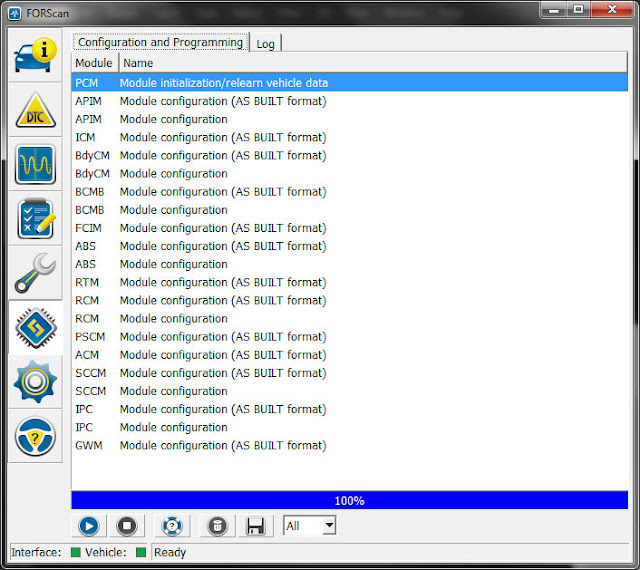
What you want to do is go into the computer-chip-looking tab in FORScan where you normally edit as-built. At the top, you'll see a new function for the PCM – "Module initialization/relearn vehicle data" – see this screen shot:

Correct Mustang Speedmeter with VXDIAG & Forscan 2

Highlight that function and hit the play button, and follow the onscreen instructions to the letter.

Once it's finished, rescan for DTC's and remove the P160A DTC. Go drive around and scan for DTC's again. You should be in the clear.

Note that if you ever wish to return to stock, you'll have to run this procedure again after setting the as-built values for the tire size back to stock.

What should I do if I haven't changed my tires but my speedometer doesn't match my cruise setting? The speedo reads fast!

I feel this needs to be addressed, because people don't seem to believe it.

There is a *large* amount of parallax error in these cars when the needle is pointed up, which it is when you're at highway speeds of around 70-80. At those speeds your speedometer will appear to read 2-3mph faster than your cruise setting.

Why? The needle is thick and spaced out from the gauge face, so the perceived "needle" (the illuminated red center section) will give a great deal of parallax error unless you're viewing perfectly perpendicular to the needle.

Unfortunately, the designers chose to put the speedometer in such a position that reading the speedo with your head perfectly perpendicular to the needle means moving your head WAY right, far away from any natural position in the car.

www.vxdiagshop.com
VXDIAG VCX DoIP vs VCX SE vs VCX NANO Hardware

Here comes the hardware parameter comparison among vxdiag vcx doip, vcx se and vcx nano series diagnostic scanners.


VXDIAG VCX DoIP

VXDIAG VCX SE

VXDIAG VCX NANO

Main Unit

vcx-doip-hardware-1

vcx-se-hardware-1

vcx-nano-hardware-1

Top/Bottom View

vcx-doip-top bottom view

vcx nano top view


Cables/Connectors

vcx doip cables

vcx se cables

vcx nano cables

Processor

Dual processor 580MHz + 180MHz

Dual processor 580MHz + 180MHz

180MHz

DoIP Protocol

Option 1/2

Optional 1


WLAN

802.11n 150Mbps

802.11n 150Mbps

802.11n 75Mbps

USB Connector

USB 3.0 Type-B

USB Type-C

USB Micro

WLAN Connector (pc)

RJ45 LAN 10/100M

USB Type-C to RJ45 Converter

No

Wireless Connector (PC)

WLAN 802.11 b/g/n

WLAN 802.11 b/g/n

WLAN 802.11 b/g/n

Diagnostic Connector

DB-26 to OBD-II

OBDII

OBDII

Remote Diagnosis (DoNET)

Yes

Yes

No

Size

L x W x H = 175 x 110 x 45 (mm)

L x W x H = 140 x 50 x 25 (mm)

 L x W x H =140 x 50 x 25 (mm)

Weight

Net weight 0.6KG

Gross weight 2.3KG

Net weight 0.3KG

Gross weight 0.8KG

Net weight 0.3KG

Gross weight 0.8KG

Case

Aluminum metal + reinforced plastic shell

reinforced plastic shell

plastic shell

LED

4 LEDs

Power, WLAN, Communication and vehicle

4 LEDs

Power, WLAN, Communication and vehicle

2 LEDs

Red;: Device Status

Blue: Communication status

Car Brands

13 brands, Benz, BMW, VAG, JLR, Volvo, GM, Ford, Mazda, Subaru, Toyota, Honda, Porsche (piw-is-1 and pi-wis-ii)

13 brands Benz, BMW, VAG, JLR, Volvo, GM, Ford, Mazda, Subaru, Toyota, Honda, Porsche (piw-is-1 and pi-wis-ii)

Single brand (6)

GM, Ford Mazda, JLR, Volvo, VAG, Toyota

Vehicle Protocol

ISO-13400 DoIP

ISO-9141 K-Line

ISO-14230 K-Line

ISO-17987 LIN BUS

ISO-15765 CAN

SAE-J1850-VPW (GM Class2)

SAE-J1850-PWM (FORD SCP)

ISO-11898-2 DWCAN

ISO-11898-3 DWFTCAN

SAE-J2411 SWCAN (GMLAN)

VAG TP16 CAN

VAG TP20 CAN (SAE-J2819)

VAG KW81 (SAE J2818)

SAE-J2610 SCI (Chrysler)

SAE-J1567 CCD BUS (Chrysler)

SAE-J2740 GM ALDL

SAE-J2809 HONDA DIAG-H

NISSAN DDL UART with CLOCK

BMW DS2

FORD UBP

BENZ KWFB

BENZ MB-ISO

ISO-13400 DoIP

VAG TP16 CAN

ISO-9141 K-Line

VAG KW81 (SAE J2818)

ISO-14230 K-Line

SAE-J2610 SCI (Chrysler)

ISO-17987 LIN BUS

SAE-J1567 CCD BUS (Chrysler)

ISO-15765 CAN

SAE-J2740 GM ALDL

SAE-J1850-VPW (GM Class2)

SAE-J2809 HONDA DIAG-H

SAE-J1850-PWM (FORD SCP)

NISSAN DDL UART with CLOCK

ISO-11898-2 DWCAN

BMW DS2

ISO-11898-3 DWFTCAN

FORD UBP

SAE-J2411 SWCAN (GMLAN)

BENZ KWFB

VAG TP20 CAN (SAE-J2819)

BENZ MB-ISO

ISO-9141 K-Line

ISO-14230 K-Line

ISO-15765 CAN

SAE-J1850-VPW (GM Class2)

SAE-J1850-PWM (FORD SCP)

SAE-J2411 SWCAN (GMLAN)

VAG TP20 CAN (SAE-J2819)

VAG TP16 CAN

VAG KW81 (SAE J2818)

Detail info.

VCX Multi Tool Info.

VCX SE Info.

VCX NANO Info.

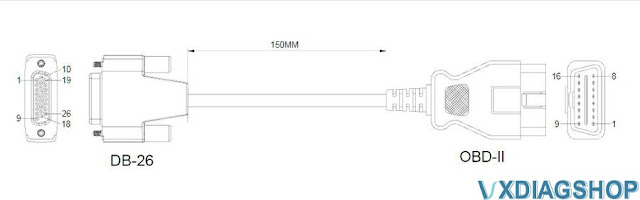
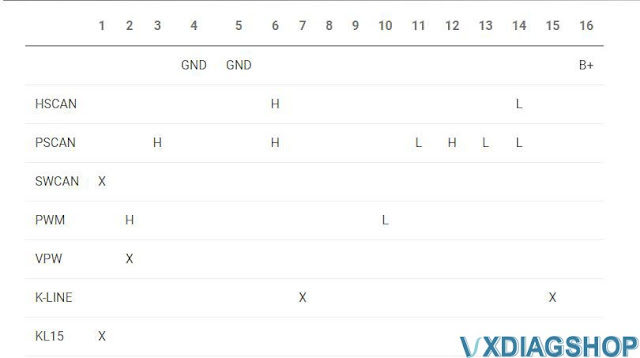
VCX DoIP DB26  OBDII Cable Pinout

VCX DoIP DB26  OBDII Cable Pinout 1

VCX DoIP DB26  OBDII Cable Pinout 2

VCX SE OBDII Cable Pinout

VCX SE OBDII Cable Pinout

VCX NANO OBDII Cable Pinout

VCX NANO OBDII Cable Pinout

Technical support from vxdiagshop.com
How to Set up VXDIAG VCX NANO Ford with RDT Software?

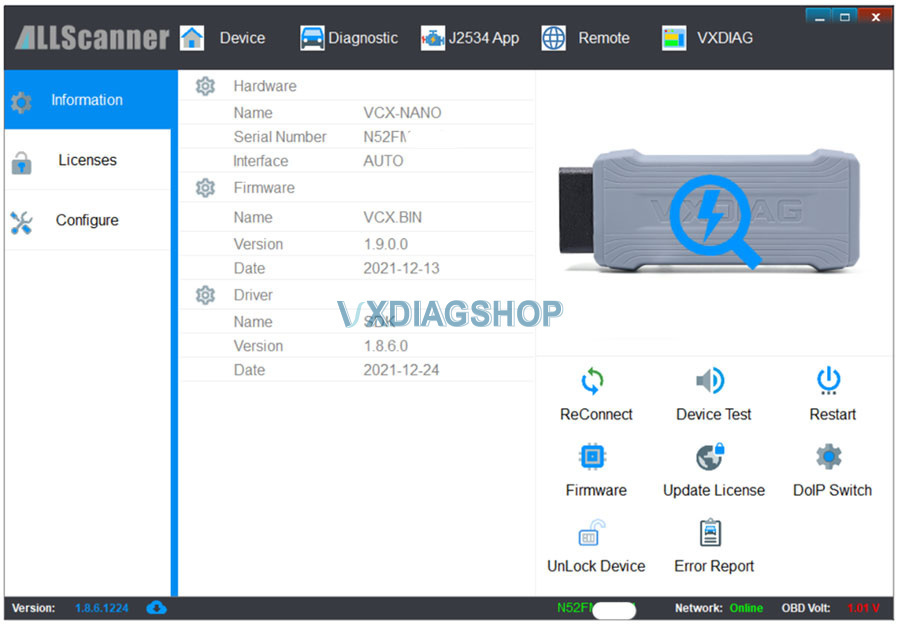
Confirmed! vxdiag vcx nano ford and vcx se j2534 passthru devices are tested working with free RDT software. Works perfectly though.

What’s RDT software?
The ROUSH Diagnostic Tool (RDT) is a free desktop application available from ROUSH CleanTech that may be used for PCM calibration updates as well as diagnostics. The tool features data logging capabilities as well as DTC read/clear and KOEO/KOER functions.

Using Google Chrome, the software is downloaded to a laptop by following this link to register: http://rdt.roush.com/RoushRdt/. Each laptop will require a new download of the software.

How to set up VXDIAG VCX NANO Ford with RDT software?

The VXDIAG VCX Nano seems to work great with RDT and Ford IDS.

Helpful links:

The instructions that came with the VXDIAG VCX Nano Ford IDS to be the easiest to follow:

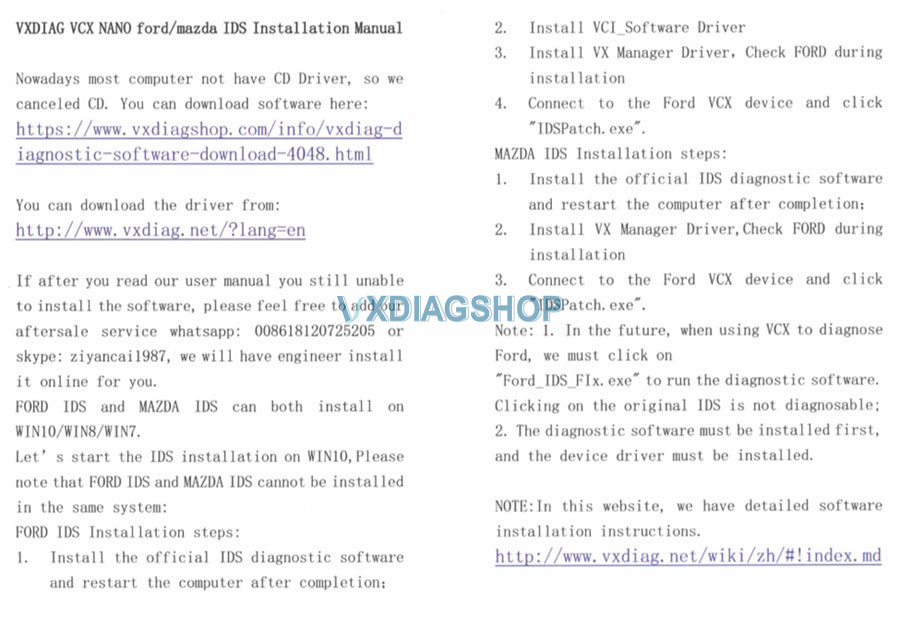
install-vxdiag-ford-ids-1.jpg

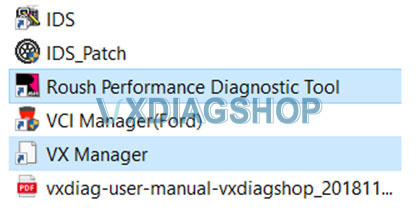
Follow the entire process above, so Ford IDS is also installed. RDT and VX Manager are all you have needed so far.

use-vxdiag-ford-with-RDT-software-1.jpg

Linking and Setup
-Connected the vxdiag j2534 device to the laptop and open the VX Manager.
-The app recognized the device immediately.

use-vxdiag-ford-with-RDT-software-2.jpg
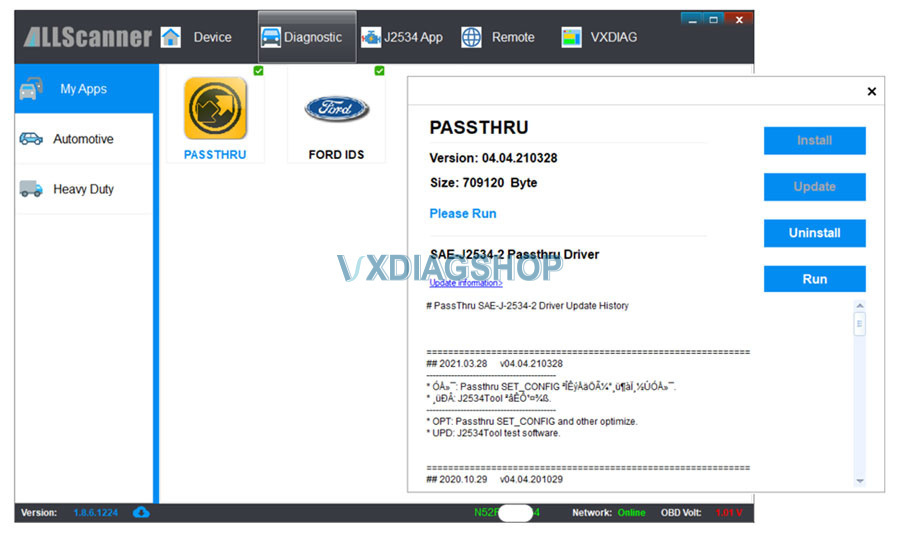
-Clicked on the Diagnostic tab.
-Clicked PASS THRU.
-Installed PASS THRU.

use-vxdiag-ford-with-RDT-software-3.jpg

-Installed and registered the Rosh Diagnostic Tool following the Roush clean tech video:
https://www.roushcleantech.com/pcm-programming-with-rdt/
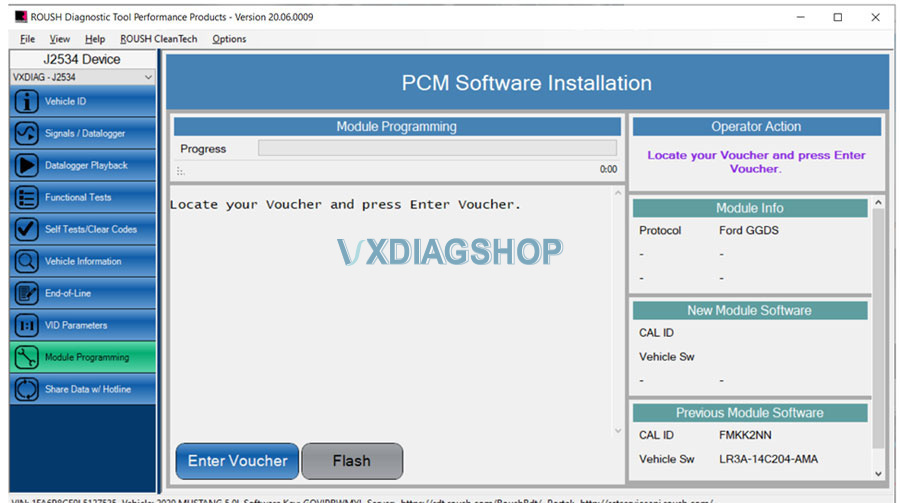
-Opened the RDT app and followed the clean tech video up to the entering the voucher.

All seems legit.

use-vxdiag-ford-with-RDT-software-4.jpg

You can use the Mouse Jiggler app (Zen enabled) to stop your laptop from hibernating and you’ll be running an ethernet cable out to the garage for the flash.

*Vxdiagshop.com does not provide RDT software nor technical support for it.