GMC Sierra 2500 THEFT LOCKED Solved by SPS2
Problem:
I have a 2022 GMC Sierra 2500.
I replaced the radio with used one from ebay. It displayed THEFT LOCKED.
Solution:
I have the dealer software SPS2 and vxdiag vcx nano gm scanner. So I went to program it with that. It asked to insted USB drive into PC which I did.
It then transferred all the new software to the USB drive. It then said its safe to remove and programming completed.
Now the headached, I cannot get it to do anything when I insert into with of the 2 USB drives under the climate control. Just display theft locked and does not load any software.
UPDATE:
I removed the theft lock using Techline Connect diagnostics. Just need to know how to updated the sofwtare now, its already on the USB drive but does nothing when I plug it into vehicle
2nd update, I cleaned the usb connector at back of the interface and it detected the drive immediately, It detected the software update and took 30 minutes to install.
VXDIAG VCX SE ODIS License Invalid Solution
Problem:
I tried to use ODIS 7.2.1 software with vxdiag vcx se pro, it said license invalid and asked me to update VCI. Then i tried to install/update 6154 driver, but it displayed another error reading license file. Any suggestion?

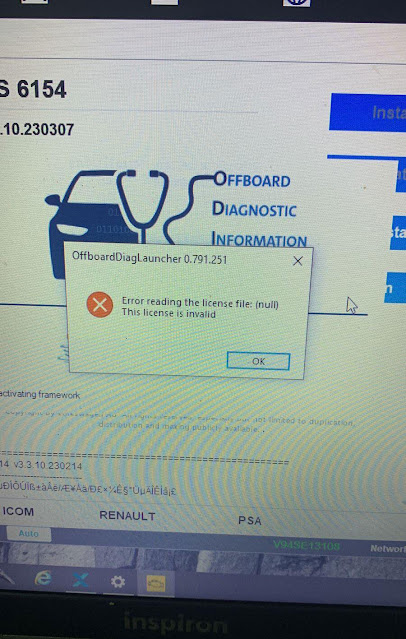
If cannot see your license, contact vxdiagshop.com to add license to your vcx se.
http://www.vxdiagshop.com/wholesale/license/
If don't have software license, you will get an error reading license file (like in image 2) when installing 6154 driver.
If still get the same error after adding license to the device, update firmware and VCI, then try again.
Failed to Clone VXDIAG Benz Xentry Software Solution
Problem:
I got the vxdiag vcx benz and xentry hard drive. I can't close the xentry, when I want to terminate the xentry it doesn't do anything. Any solution?
Solution:
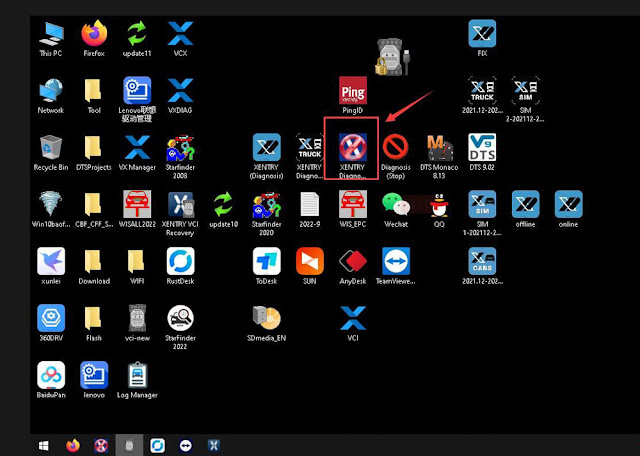
1. Press Xentry Diagnostic close icon on desktop marked red image below to close Xentry
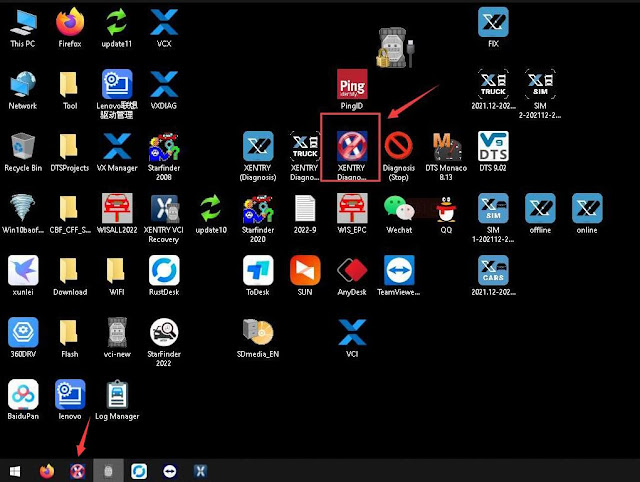
2. You can also run close icon on task bar to close xentry.
VXDIAG Benz No 2023 VCI Version Selection Solution
Problem:
I recently got my vxdiag vcx se Benz xentry updated to v2023.06 (through new hard drive). After activating xentry and trying to sync VCI, i cannot see 2023 VCI versions. Tried delete and reinstall vx manager, still the same. Any solution?

Go to Diagnostic tab, Update Benz C6 driver
After update C6 driver, run Xentry recovery tool on the desktop to sync Xentry VCI.
Update firmware/VCI-> Update C6 driver-> Sync VCI.
Will VXDIAG Tech2win do Australian Holden?
As titled, does vxdiag vcx nano gm tech2win work on Australian Holden?
The answer is NO.
Review 1:
Once up and running I can use GDS for 2014 up Holden Commodores and AC Delco SPS programming through the pass thru works fine as well. BUT load tech2win with any Holden Commodore software and watch out as it does not read anything but the CAN bus modules and can set codes on the GM Lan bus modules.
Review 2:
I am semi retired auto elec in Ozzie and have had to go back to work . i mainly do car yards and mechanic shops to diagnose. i have brough a vxdiag vcx nano to do some basics on gm holdens which is common in Ozzie. i find it works on engine – trany and abs but no comms on radio – cluster and hvac.
Review 3:
I had VX nano tech2win wouldn't work on Ozzie holdens unless it had a chevy engine thats about all it talked to.
FYI: GDS2 and SPS2 works fine with Holden.
GDS2 tested working, but need to install 2012 x86 redist package.
VXDIAG VCX NANO GM Not Communicate with Holden VF
Commodore?
SPS2 and Techline Connect also tested working: