Can I Use VXDIAG with Mitsubishi MUT-3 Software?
Does vxdiag scanner works as j2534 passthru for Mitsubishi MUT III diagnostic software?

VXDIAG does not have license for Mitsubishi. Some tested ok as j2534 passthru device. Some don't. Need luck.
Here is the MUT-3 driver for J2534 device. Free to test by your side. You are at your risk.
You need to copy the driver folder of vxdiag, open regedit navigate to Computer\HKEY_LOCAL_MACHINE\SOFTWARE\WOW6432Node\PassThruSupport.04.04 and export the folder vxdiag to your desktop, add any name when ask you.
After remove the vxdiag software. Copy the drivers folder at the same location it was before. And click the reg file from the desktop that you save before.
This way you will have your vxdiag drivers installed without the vxdiag software to control your lisense. vxdiag (for example vcx nano toyota) will work, nothing will change there, and try again with mut-3. if dll files from driver are not locked too it will work.
edit: the drivers folder you need to copy before remove vxdiag soft is here: C:\ProgramData\VCX\Apps\PASSTHRU\
open the folder in programdata\vcx\app\and check if you have toyota folder and save it to desktop, remove vxdiag. and download the ready drivers and reg above.
Run the reg file and try mut-3.
VXDIAG VCX NANO Toyota vs Xhorse MVCI Pro Cable
Toyota Techstream interface VXDIAG VCX NANO and Xhorse MVCI Pro which to choose?
Check table comparison below:
| Item | VXDIAG VCX NANO Toyota | Xhorse MVCI Pro (Toyota) |
| Manufacturer | Allscanner VXDIAG | Xhorse |
| Car Brand | Toyota only | VAG, Toyota, Honda, Ford/Mazda, Subaru |
| Driver | VX Manager | MVCI Pro driver |
| Operating system | Win7, Win10 | Win7, Win10 |
| License | Have license for Toyota | Need authorization for Toyota |
| Update | Software update by link
Firmware update online |
Software update by link
Firmware update online |
| Compatible with techstream | Latest v18 | Latest v18 |
| Vehicle coverage | Toyota 2005 to 2022 | Toyota 2005 to 2022 |
| Old K-line | No | No |
| Toyota full system diagnostic | Yes | Yes |
| Program TPMS | Yes | No |
| J2534 Passthru | Yes, compatible with original TIS Techstream subscription to program modules online | No, cannot be used as j2534 passthru for OEM software |
| Price | $89 | $95 |
VXDIAG Toyota Device Type Selection

Xhorse MVCI Pro Toyota device type selection

Xhorse MVCI Pro is similar to MINI VCI cable, it will read DTC, erase DTC, read datastream, but it cannot program TPMS sensors. It cannot be used as J2534 passthru device to program module.
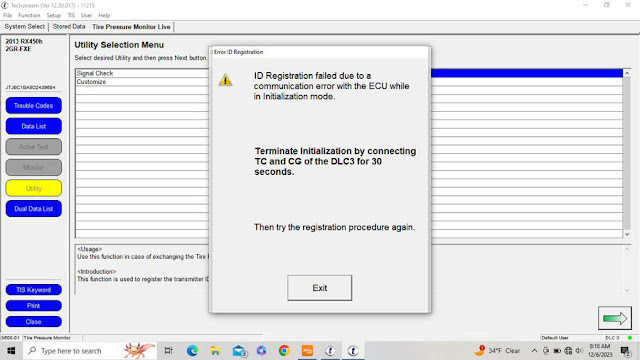
VXDIAG vcx nano toyota techstream does program TPMS. Tested by many.
Topix Cloud Not Detect VXDIAG VCX SE JLR?
Problem:
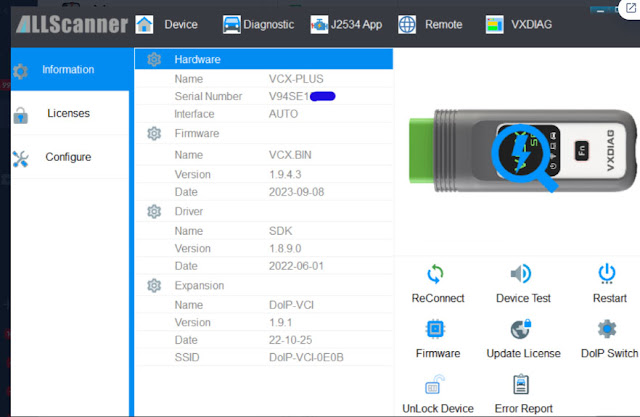
Topix cloud isnt detecting vxdiag vcx se jlr doip vci. i tried reinstalling vci software but it didnt work.
Keeps asking to install new version of VCI drivers. But cannot find where to install this vci driver. Pathfinder software works though.

Answer:
JLR Topix Cloud banned all 3rd party devices.
So vxdiag jlr device is not working with Topix Cloud anymore.
Choose Pathfinder HDD Offline Unlocked without TOPIX Login instead.
VXDIAG GM GDS2 PC Software Installation Error Solution
Some users reported that they got 2023.10 vxdiag vcx nano gm gds2 software installed on Windows 7 laptop, when run gds2, it was not working. Gave the error "PC software installation error (or missing Server)".
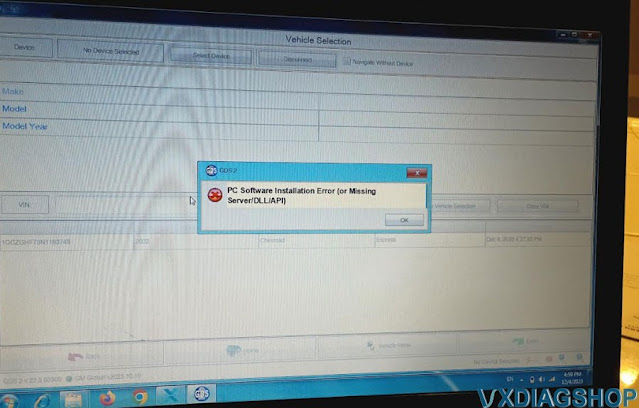
2023.10 GDS2 is not compatible with Windows 7 operating system.
It works fine on Windows 10 and 11 system.
Same as DPS 4.52 software, better set it up on Win10 or Win11, otherwise will report same error message.
Free Download VXDIAG Ford IDS 130 Mazda IDS V131
Latest version Ford IDS V130 and Mazda IDS V131 were tested working fine with VXDIAG scanners.
Software version:
Ford IDS V130
Mazda IDS V131
Operating system:
Windows 7/Windows 8/Windows 10
Multi-language
Compatible devices:
VXDIAG
VCX NANO Ford/Mazda USB or WiFi,
VCX
SE or VCX
Plus Ford/Mazda

Password: qq8s
Password: a7gu
Password: k55y
How to Install VXDIAG Ford & Mazda IDS?
Ford IDS Installation:
1. Install Ford IDS-1**
2. Wait for the installation of Ford IDS – 1**,
and restart the computer
3. Install the Ford original VCI software_
1.0.0.10.exe
4. Install VX manager and IDS driver on VX manager "Diagnostic"
Menu
5. Wait for VX manager and IDS driver installation to complete
6.
Connect VCX device and install idspatch
7. Use idspatch to open IDs and start
diagnosis.
Mazda IDS Installation:
1. Install mazdaids-1**
2. Wait for mazdaids – 1** installation to
complete and restart the computer
3. Install VX manager and IDS driver on VX
manager "Diagnostic" Menu
4. Wait for VX manager and IDS driver installation
to complete
5. Connect VCX device and install idspatch
6. Use idspatch to
open IDs and start diagnosis.