Benz Xentry update to V2020.06 VXDIAG Full
VXDIAG full brands released new software in June 2020, including Xentry 2020.06, ISTA-D 4.22.20 etc.
vxdiag full 2TB HDD software including:
BMW ISTA-D 4.22.20 ISTA-P 3.66.100
BENZ Xentry 2020.6
VW ODIS 5.1.6
JLR SDD V159
Porsche PIWIS II V18.100.000
VOLVO VIDA 2014D
FORD IDS V117
MAZDA IDS V117
GM GDS2 v21.0.01501 / 2020.1, tech2win 23.002,
TOYOTA Techstream V15.00.026
HONDA HDS V3.102.054, i-HDS V1.004.025
SUBARU SSM III 2018.10
BENZ Xentry 2020.6
VW ODIS 5.1.6
JLR SDD V159
Porsche PIWIS II V18.100.000
VOLVO VIDA 2014D
FORD IDS V117
MAZDA IDS V117
GM GDS2 v21.0.01501 / 2020.1, tech2win 23.002,
TOYOTA Techstream V15.00.026
HONDA HDS V3.102.054, i-HDS V1.004.025
SUBARU SSM III 2018.10

Mercedes Xentry 2020.06

BMW ISTA-D 4.22.20 ISTA-P 3.66.100

GM GDS2 v21.0.01501 / 2020.1, tech2win 23.002

Mazda IDS V117

Ford IDS V117

Jaguar Land rover JLR SDD V159

VAG ODIS 5.1.6

Volvo VIDA 2014D

Porsche PIWIS II V18.100.000

Subaru SSM III 2018.10
Note: The vxdiag full and 2TB HDD don’t include JLR Pathfinder DoIP and Porsche PIWIS III software.
VXDIAG Volvo “Not fulfill VIDA requirement” Solution
Problem:
I have a problem installing vxdiag vcx nano volvo VIDA 2014D software. It gave same error on both Windows 10 and Windows XP Virtual machine. Must i install it on Win7 Pro?
Error: One or more of the computer’s components does not fulfill VIDA’s requirements.
This installation will be aborted.
Solution:
VXDIAG Volvo VIDA does not support Windows 10 nor VMware.
Install VIDA 2014D on Windows 7 operating system only.
VXDIAG BMW ISTA Display Auto or Manual Search Solution
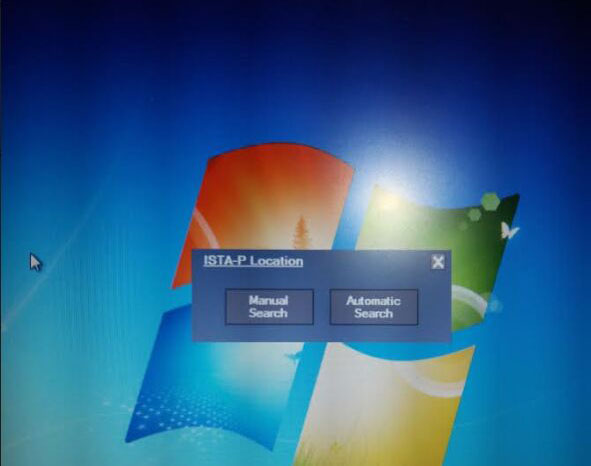
Recent some users reported that they had problem using vxdiag full or vxdiag vcx se BMWista-p software.Run ISTA-P software, it prompts to "Automatic search" or "Manual search" , but no matter select what option, it stuck and not move on. How to solve it?

Possible reason:
ISTA Version is too old. There is no ISTA-P Fix file on desktop.
Solution:
Get the VXDIAG BMW ISTA software updated.
Both vxdiag full and vcx se BMW software come in HDD format. You can either send back old HDD or buy a new HDD to update.
How to Solve VXDIAG Volvo stuck on user name menu?
Error:
The VXDIAG VCX NANO Volvo VIDA2014D startup screen username field is readonly, so I can’t type admin. I’m following the demo video, but I’m stuck. Any idea why? I’m using windows 7. Are there more specific requirements?

Solved!
I got it working, but it required some modification. In the vida\patch folder there is a cmd file that executes OSQL.EXE, but it is using the x86 path instead of the x64 path, so I changed the line to run via Program Files (x86) instead of %ProgramFiles% and ran the cmd manually from the powershell command line, reboot, and now the username field is no longer read-only, and Vida seems to be running.

VXDIAG VCX NANO GM BCM programming review
The other reviews claiming this tool doesn’t do what its supposed to is due to them not understanding how to use it.
I have a pretty powerful automotive scanner that is bi-directional but I needed to be able to download AC Delco software to program a brand new BCM that came blank.
It comes with pre-loaded GM software that you would otherwise have to pay for from AC Delco, but that wasn’t what I needed, although it’s nice to have. I needed the J2534 pass-thru protocol (GM Calls it an MDI). My only complaint is initially the AC Delco automated programming software you purchase from the site wouldn’t recognize the MDI tool. After updating the drivers from VXDIAG, upgrading the firmware on the actual hardware, and ALSO loading the drivers that AC Delco recommends, the tool finally showed up through the MDI selection process.
You also need to have the VXDIAG software running in the background that recognizes the tool is connected before loading the GM software. Once that was all set up, the pass thru worked great, the programming process was simple and intuitive, and I was able to get the BCM programmed without an issue.
It wasn’t a simple plug and play like some would probably like, but it’s also only $105 for this tool (I got the WiFi version), unlike the Bosch MDI that is exponentially more expensive.
I will be purchasing more of the VXDIAG tools for other manufacturers now knowing their hardware is effective and reasonably priced.