Chevrolet Astro Crank Relearn with VXDIAG tech2win
I recently picked up a 2003 Chevrolet Astro and changed the engine with a used one from a 2005 Blazer. Both engines have the same crank sensor. I need to do a relearn anytime the Crank Sensor is changed.
There is a procedure to do it without a tech II/professional grade scan tool, but it’s very complicated, the cheapest tool can do it is the VXDIAG VCX NANO.
I got the USB version vxdiag vcx nano gm comes with a Tech2 emulator about $110 from vxdiagshop.com.
It works great for me and a lot faster than the tech2. Tech2 is 3x the cost for a clone but is standalone and you don’t need to mess with a laptop.
Larger screen. Comes with Tech2Win. You can get the user guide for tech2win.
I’ve replaced the crank sensor, and shortly afterwards I was getting a flashing SES light, but not constant, just kinda got a random 5 flashes then done, 8 the next time. Pulled over, had my tool with me, did the CKP relearn and the issue completely vanished. Needless to say, I will go ahead and do it with every CKP sensor change from now on.
After putting another 1500 miles on said van, never skipped a beat after that!
Subaru XV 2016 CVT Learning done by VXDIAG SSM3
Car model and year: Subaru XV 2016 with TR580 transmission
What I did:
Replace CVT fluid according to the repair manual.
Confusion:
I have drained only 5.5 liters of fluid (and filled with the exact amount). I’ve read somewhere that people drained 8-9 liters.
Drained hot, filled cold, but hot and cold fluid were mixed inside transmission when gears were shifted P-R-N-D and backwards, and after that added missing oil, shifted through all gears again and then drained all excess oil till it started dripping slowly through fill hole… So it should be fine based on repair manual.
Good to know:
Some models have the CVT fluid cooler which means the hold a lot more fluid. It’s a reasonably serious process to change CVT fluid. Got to get the temperature right to get the level right.
Finally, got the VXDIAG and hook it up!
There is a very specific temp the fluid need to be checked at. Not just hot or cold. I have VXDIAG SUBARU SSM-III SSM3 SSM4 Diagnostic Tool to track the temp, but they are making nuclear science of something fairly simple…
And yet, engine oil change is done without temperature checking.

Well I am pretty sure that it has some quantity tolerance, as there is no way to measure quantity with 100% precision without using the machine for replacing fluid (there is 10°C difference between lowest and highest fluid temp when replacing, so that is the first thing that change quantity)…
But anyway, I have replaced fluid, everything works fine.
Free Download VCX Driver for VXDIAG VCX SE 6154
Question:
I got the vxdiag vcx se 6154 with hdd odis 8.2.0. but failed to run service software, it said error 126.
Error: Loadlibrary(VCX_X64.dll) ErrorCode=126.
Any idea?
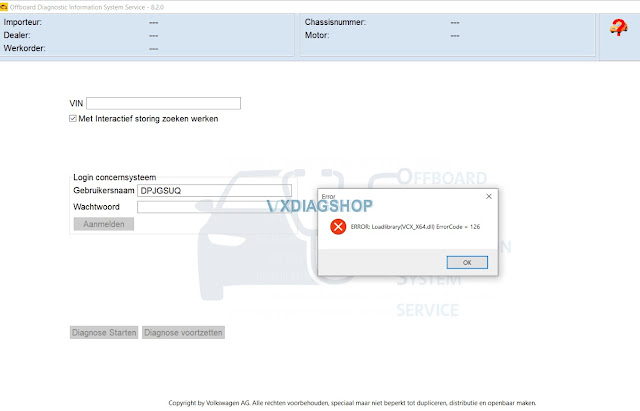
The error code 126 is caused by misising VCX driver.
Free download VCX 6154 Driver 1.8.4.1208.exe
Install driver it would be fine.
Feedback:
Now it is working.
Chevrolet Camaro5 Scanner MDI or VXDIAG VCX NANO
I bought a Chinese clone Tech 2/GDS2 MDI on vxdiagshop.com for $115. I can sub to GM’s TDS for SPS programming for $40 per VIN at 2 years. As a Tech2 clone w/CANDI module and GDS 2 software (what our cars use) it works great. Have set it up on Win7 32bit laptop. Tech2 works fine, but our cars don’t use it.
As far as i know GM doesn’t check what hardware/software you are running. I can use the hardware you purchase and subscribe to the SPS, but there is no way to get it ‘free’, as everything is held on GM’s servers.
GDS2 allows me to test and monitor every module on the car. I have a window issue and it allows me to roll up/down my windows from the laptop. Other things I have played with are holding specific RPM while checking sensors. I mean you can do anything – activate wipers, squirt washer fluid for enjoyment, reset steering angle, relearn HVAC blend doors, relearn and adapts for TCM on auto trans, activate ABS module for bleeding – anything with a module can be remotely activated and tested via the GDS2. Anything a $4000 Snap On handheld can do the GDS2 software can also do. It’s powerful stuff – Especially for $115 and time to set it up.
Overall I suggest doing as much research as possible for what your needs are as there is a lot to learn here. I bought the VXDIAG VCX Nano because it best suited my needs and was inexpensive, but there is a bit of a headache to the setup. Some others are easier to set up and look like official GM badged units (MDI/MDI2) but cost more. Take your time if you decide to get into this and research as much as possible. Just remember that its not only the ability to program modules, but you also get a full diagnostic setup for any GM vehicle that supports Tech2 and GDS2.
VXDIAG Ford and Mazda IDS Update to V124.01
Allscanner Ford and Mazda diagnostic scanner IDS V124 has been tested working fine by vxdiagshop.com technician.
Free Download VXDIAG Ford IDS V124
https://mega.nz/folder/6dwzgaJR#XW2q1xPdbgKV4XtZQqkB0w
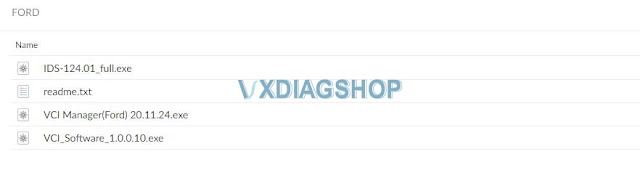
Including
FordIDS-124.01_full.exe
VCI_Software_1.0.0.10.exe
VCI Manager (Ford) 20.11.24.exe
Readme.txt
Free Download VXDIAG Mazda IDS V124
https://mega.nz/folder/iQp1UACZ#d4ey2cWHmaEMf9n2dTcTAQ
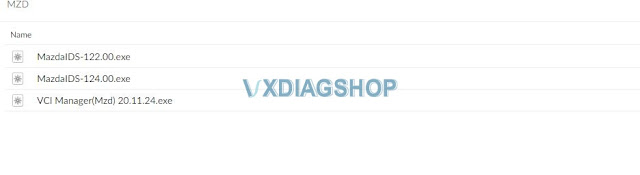
Including
MazdaIDS-124.00.exe
VCI Manager (Mazda) 20.11.24.exe
Free download IDS patch
https://mega.nz/folder/OV4RRC6B#seCWP6UCzOPWEDYlQxZ1iQ
Compatible all vxdiag Ford device: vxdiag vcx nano for Ford/Mazda USB and WiFi, vxdiag vcx pro, vxdiag full , vcm2 clone (using vxdiag solution) etc
Multi-languages: English, German, French, Italian, Dutch, Spanish, Swedish, Finnish, Danish, Norwegian, Portuguese (European) , Portuguese (Brazil)
Operating system: Windows 7, Windows 8, Windows 10
Ford IDS V124 Installation Instruction
1. Install IDS Software
2. Install VCI_Software_1.0.0.10
3. Install VCI Manager(Ford) 20.11.24
Install Ford IDS-124
Wait for the installation of Ford IDS – 124.01, and restart the computer
Install the Ford original VCI software_ 1.0.0.10.exe
Install VX manager and Ford IDS driver
Wait for VX manager and Ford VCI driver installation to complete
Connect VCX device and install idspatch
Use idspatch to open IDs and start diagnosis.
Mazda IDS V124 Installation Instruction
1. Install mazdaids-124
2. Wait for mazdaids – 124 installation to complete and restart the computer
3. Install VX manager and Ford IDS driver
4. Wait for VX manager and Ford IDS driver installation to complete
5. Connect VCX device and install idspatch
6. Use idspatch to open IDs and start diagnosis.
Note:
1. Ford IDS requires VCI Manager driver, Mazda IDS does not.
2. Ford IDS and Mazda IDS need to be installed on separate systems.
3. Don’t install IDS on Home version windows system.