What J2534 device should I choose for MB Xentry Passthru?
VXDIAG VCX SE Benz(as well as other vcx se interfaces) or Tactrix OpenPort 2.0 which is a better J2534 device for Mercedes Benz Xentry Passthru software?
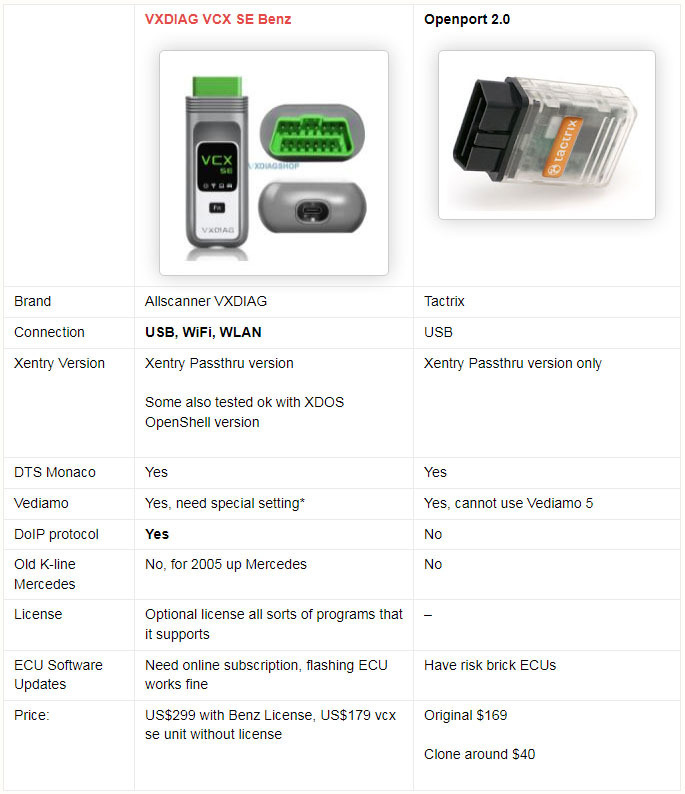
Pros:
- The main reason for buying vxdiag is that it has DoIP for new cars.
- vcx se connects via WiFi and it's very convenient. wlan connection is stable at a distance of up to 2 m.
- there is already a Type C connector and it is held very tightly
- firmware updatable
- you can also use BMW and there are a lot of all sorts of programs that it supports
- The device does not heat up as SD CONNECT does.
- as much as 42 modules can be scanned
- Work best offline.
Cons:
It does not support older models with K-line protocol, it is for 2005 up Mercedes.
Openport:
Pros:
- Good reasonably priced option if you don't need to do any module updates.
- Openport 2.0 is not limited on Can- Cars from 2006 and above!
- useful for ECUs with CAN capability.
- For normal troubleshooting and diagnosis, though, it rocks.
Cons:
- you won't be able to access K-Line ECU's that are widely used in old models (W221, 220, 203, 211, 210)
- if you want to work with vediamo you can't use vediamo 5 (4 can't use smrd files) because vediamo 5 doesn't support Passthru so your "stuck" with DTS Monaco
- You'd better replace R1 by 47k for better operation and to avoid overheating.
- You are risking of getting failed and then potentially bricking your ecu if need to do ECU SW updates.
How to Solve VXDIAG ISTA 4.33 4.34 Firmware Error?
Question:
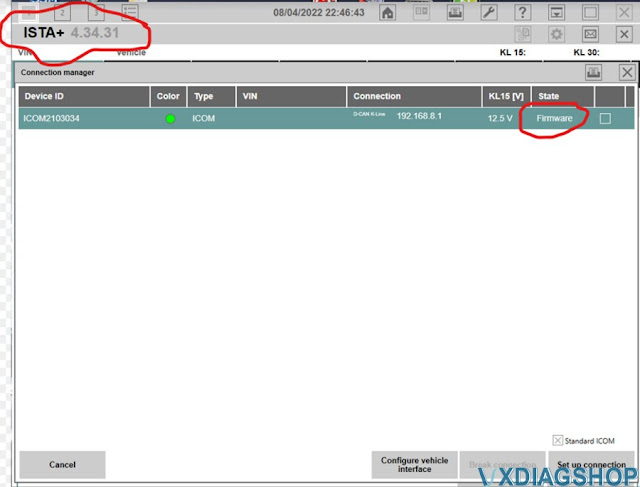
I got thevxdiag vcx se BMW, when connecting to ISTA 4.34, it says need a firmware update, where can I get firmware for the connector?
First tried Version 4.34.31. I also tried a 4.33.xx version and got the same firmware error.

Solution:
VXDIAG default ISTA (ISTA+) goes toV4.32.BMW driver is not update-to-date to support 4.33 or 4.34 above version.
You will be informed once there is a new BMW driver version.
It is recommended to get thevxdiag bmw hddinstead.
VXDIAG JLR SDD Self-Registration Error Solution
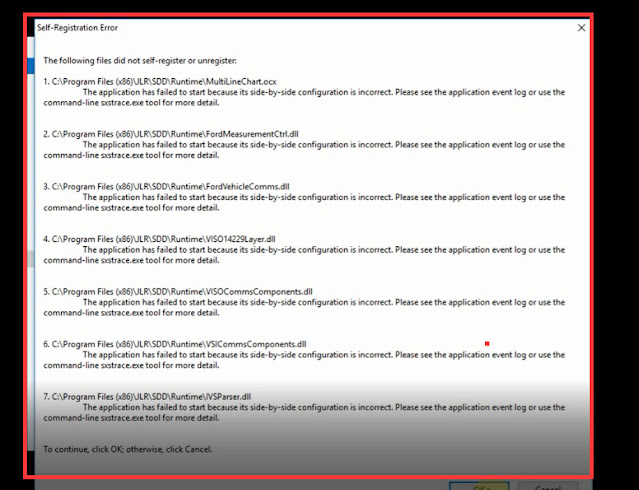
Here is the working solution toVXDIAG JLR SDD V162self-registration error. The error usually occurs on Windows 10 system.
Follow steps below to solve the problem.
Step 1. free download necessary programs from the below link:
https://mega.nz/folder/6jBQwLjS#s51J38OxUufw_7p6wpAbNw
File including:
1).DefenderControl
2). JLR Psonic Script Setup WIN10
3). MSVBcrtAio_v20190720.zip
Then follow guide here to run the necessary program.
http://blog.vxdiagshop.com/2021/10/15/vxdiag-jlr-sdd-application-failed-to-start-on-win10/
VXDIAG JLR SDD upgrade to V162 (with free download included)
Users may get an AccessDenied error when downloading SDD software from JLR official because Jaguar Land rover service is down in April 2022 as we informed previously.
Is It True That JLR Pathfinder Will Be Shut Down In April?

Where to download JLR SDD V162 the latest version till April 2022?
Vxdiagshop.com provides JLR SDD V162 software free download resource in mega link.
The patch here is for VXDIAG only
Free download JLR SDD V162 software
JLR SDD V162.00 Full.exe
https://mega.nz/folder/DpBi3ZCT#InhSYxHhoB6d9sWG3ZyEwg
.png)
JLR SDD Patch for VXDIAG devices https://mega.nz/folder/HJhn3AgI#Z9ftCLLNlO7exoCo6lC2aw
Multi languages: English Japanese Portuguese Romanian Korean Dutch Polish Turkish Spanish French Italian Croatian Danish German Swedish Finnish Slovenian Czech Russian Greek Chinese
Operating system: Win7, Win10
VXDIAG benz device has driver error and prompts file check failed
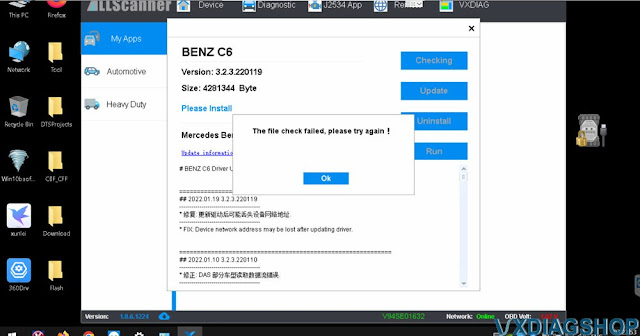
Here comes the solution to theVXDIAG Benz C6multiplexer driver installation file check failure problem. The error occurs when installing c6 driver for2021/12 xentrysoftware.
Error displayed:
‘The file checked failed, try again’
‘Connect device error, ping failed’
Delete and install the C6 driver again, got another error RunCommand Error
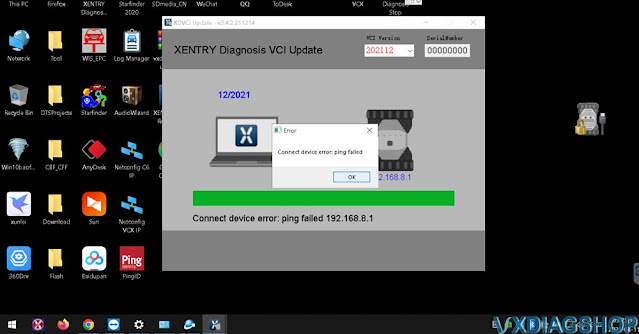

Solution:
The customer has got the technical support fromvxdiagshop.comengineer via Teamviewer.
Change another good network connection, and reinstall Benz C6 driver.
Try again it works without problem.
