VXDIAG VCX FD vs VCX DoIP vs VCX SE
What is the difference between the new VXDIAG VCX FD (VCX CAN FD) series and older VCX series?
| Item | VXDIAG VCX FD | VXDIAG VCX DoIP | VXDIAG VCX SE | VXDIAG VCX NANO | |
|---|---|---|---|---|---|
 |
 |
 |
 |
||
| A new generation of intelligent vehicle diagnostic interface | Full-brand vehicle diagnostic equipment | Remote vehicle diagnostic interface | Dedicated vehicle diagnostic interface | ||
| Hardware parameter | dual processor 580 + 550 MHz | dual processor 580 + 180 MHz | dual processor 580 + 180 MHz | uniprocessor 180 MHz | |
| DoIP protocol | Yes DoIP Option1/2 | Yes DoIP Option1/2 | Supports DoIP Option1 | No | |
| CAN FD protocol | Yes | No | No | No | |
| Network connector | 802.11n 150Mbps | 802.11n 150Mbps | 802.11n 150Mbps | 802.11n 75Mbps | |
| USB connector | USB Type-C | USB Type-B | USB Type-C | USB Micro | |
| WLAN connector | USB Type-C to RJ45 | RJ45 | USB Type-C to RJ45 | No | |
| OBDII connector | OBD-II | DB-26 to OBD-II | OBD-II | OBD-II | |
| OBDII Pin switch | OBD All-pin intelligent switching | OBD All-pin intelligent switching | OBD All-pin intelligent switching | No | |
| Remote diagnostic (DoNet) | Yes | Yes | Yes | No | |
| Car brands | Multi brands, for Honda, Toyota,
JLR, Porsche, Volvo, Renault, Nissan, Ford/Mazda, GM, Benz, BMW, PSA, VAG |
Multi brands, for Honda, Toyota,
JLR, Porsche, Volvo, Renault, Nissan, Ford/Mazda, GM, Benz, BMW, PSA, VAG |
Multi brands, for Honda, Toyota,
JLR, Porsche, Volvo, Renault, Nissan, Ford/Mazda, GM, Benz, BMW, PSA, VAG |
Single brands
for Ford/Mazda, GM, Toyota, Volvo, Nissan, Renault, JLR, VAG |
VCX FD adds new CAN FD protocols and will do latest CAN FD GM, Ford Mazda etc.
VCX NANO does not have a reset button, others do have one.
All firmware can be updated online. Software update by link except BMW ISTAP, Benz Xentry, JLR Pathfinder and Porsche PIWIS II/III.
Software shares the same function.
https://www.vxdiagshop.com/service/vxdiag-vcx-fd-vx-vcx-doip-vs-vcx-se-vs-vcx-nano.html
VXDIAG Benz WIS Failed to Lock File Solution
Problem:
I have a problem opening VXDAIG
VCX SE Benz WIS/EPC software via VMware. Error failed to lock the
file.
Any solution?

Solution:
There is a WIS database in the C drive. Extract files and run again.
Extract WISpart.01.zip file will auto extract all part01-part08 files.


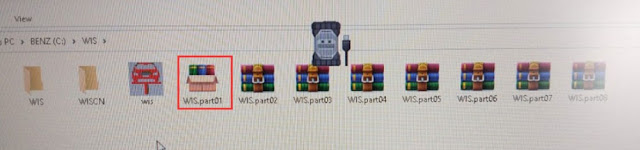
If still not working, your laptop VM-support is disabled. Go to Bios and enable Secure Virtual Machine (SVM). Then run WIS again.

Or contact us to get the new WIS2024 patch for WIS, then run WIS2024 on the desktop directly without VMware (EPC still need to run thru VMware).
VXDIAG Benz WIS Not Display Wiring and Repair Guide Solution
Problem:
VXDIAG VCX SE Benz WIS/ASRA is not displaying wiring diagrams and repair procedures, only parts catalog. Is possible for me to get that function back?


Solution:
The patch for WIS has expired.
Contact us to get WIS2024.exe new patch for WIS.
Skype:vxdiag.com
Email:sales@vxdiagshop.com
WHATSAPP:0086-18064450969
Put this file on the desktop and run it.

Report:
I run it and it is working great.
https://www.vxdiagshop.com/service/vxdiag-benz-not-display-wiring-diagrams-solution.html
VXDIAG JLR HDD Loading Error Solution
Here comes the solution to VXDIAG JLR DoIP hard drive failed to load problem from vxdiagshop.com customer.
Problem:
I can't start the JLR disk, I have a loading error, screenshot attached
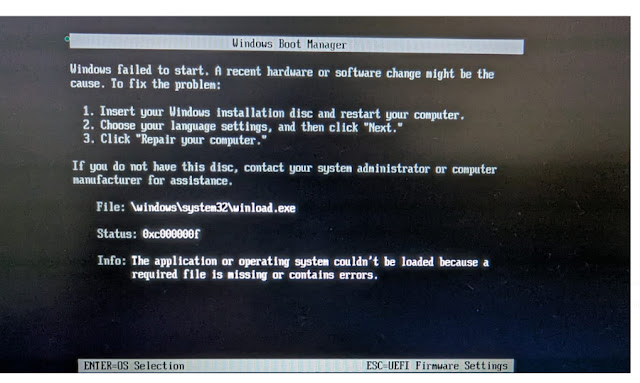
Solution & Feedback:
I resolved this issue using a Windows boot disk. Now Windows boots fine.
I downloaded Windows 10 Education.
Boot from this ISO,
click 'Repair your computer' -> 'Troubleshoot'
-> 'Command Prompt.'
In the Command Prompt, type the following
commands:
bootrec /FixMbr
bootrec /FixBoot
bootrec /ScanOs
bootrec
/RebuildBcd
Close the Command Prompt and reboot.
How to Solve VXDIAG Renault License Expired Problem?
Problem:
I got the Renault Clip V219 software installed, but the vxdiag vcx se unit cannot communicate with vehicle. It said license expired and asked to update VCI.

Solution:
Renault license is not activated.
Go to License and check if the Renault license is activated.
Purchase Renault license here.
https://www.vxdiagshop.com/wholesale/vxdiag-authorization-license-renault.html
Then provide your vcx se or vcx doip serial number to activate license.