Use VXDIAG VCX SE with Launch Smartlink B Remote Diagnostics
The VXDIAG VCX SE is a powerful and versatile diagnostic tool that offers both local diagnostic and DoNET remote diagnostic capabilities, making it an indispensable solution for automotive professionals, fleet operators, and technicians.
Local Diagnostics:
The local diagnostic function of the
VXDIAG VCX SE is designed for hands-on troubleshooting directly at the vehicle
or system. By connecting the device locally to the vehicle’s onboard diagnostics
(OBD) port, technicians can easily read fault codes, check system parameters,
run component tests, and perform calibration or programming tasks. Local
diagnostics are ideal for on-site inspections and immediate fixes, offering
quick access to essential information and allowing technicians to make
adjustments directly at the vehicle.
DoNET Remote Diagnostics:
The super remote diagnostic
capability takes the diagnostic process to the next level, allowing technicians
to remotely access and control the system from any location. With this feature,
the VXDIAG VCX SE enables full remote diagnostics, including advanced system
analysis, error code interpretation, and detailed performance testing. Remote
access minimizes the need for physical presence, reducing downtime and
increasing efficiency by allowing technicians to diagnose and troubleshoot
issues without being on-site. This mode is particularly useful for fleet
management, remote diagnostics in the field, and off-site technical support.
VCX SE can be used as the C side or B side of remote diagnostics.
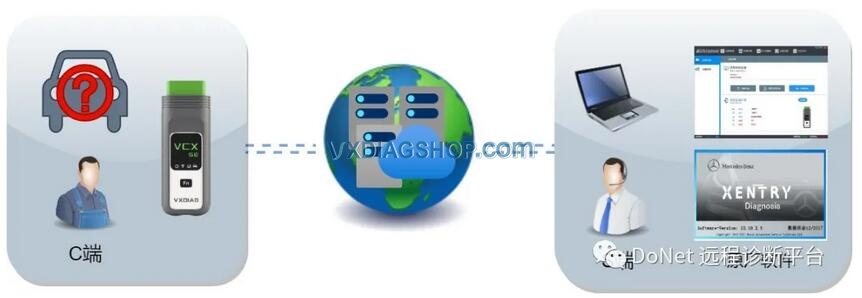
Users are allowed to set up Allscanner’s DoNET remote diagnostics for the VCX SE.
It can also be used with other remote diagnostic equipment. For example, works with Launch Smartlink B VCI for diagnostic and programming through the Launch’s super remote diagnostics system.
You can use VXDIAG with JLR, Toyota, Honda, Volvo, Porsche, Peugeot, Citroen, BMW, Benz, Nissan, Subaru etc software (need to have license activated).


VXDIAG Benz Xentry Cannot Display Module Data Solution
Problem:
Tried to scan a Mercedes W206 with VXDIAG VCX SE Benz and Xentry 2024.09 software. VCX SE is well connected and xentry will read vehicle information. But cannot display module data (shown in the image below).


Solution:
If had a similar problem, adjust the computer resolution. It will be fine.
How to Solve VXDIAG "Offline! Download License Failed" Error?
Problem:
VXDIAG VCX SE BMW scanner asks to update license. Tried to update license but failed. VX Manager is offline and download license failed. Change network and WiFi hotspot, still the same. Any solution?

Follow the solution here to change DNS IP to 8.8.8.8 and save setting. It should be fine.
VXDIAG VX Manager Offline Cannot Renew License Solution (Change IP)


User feedback:
IP changed. It works now.

VXDIAG VCX SE DoNET No Communication with DAS?
Problem:
Followed this guide to set up DoNET super remote diagnostic, the VXDIAG VCX SE Benz device was well connected via DoNET.
But it does not communicate with DAS software.


Here is the clue.
We were informed by VXDIAG engineer that the VXDIAG DoNET remote diagnostic does not work on DAS software.
If need to diagnose a Mercedes via DAS, use local connection (USB, WiFi or LAN). Don’t use DoNET remote connection.
VXDIAG VCX FD for GM & Ford Review
Here comes the honest review from VXDIAG VCX FD for Ford and GM.

“Bought vcx fd on sale ford and gm.
Ford works cable and wifi even faster
than vcm2. Tested on old escort and few new mondeo fusion.
gm gds2 also works
ok interface is seen as mdi2 didn’t test wifi thou.
tech2win tested works
also ok on all pins.
I do not recommend installing ford and gm on same
partition.
Also never start vxdiag manager before doing diagnostic. only when
need to update the license.
Tested pcmflash with vxdiag fd its slow. ”