VXDIAG Benz C6 CAL Error 870 Solution
Problem:
Has internal error when test Mercedes W211 with VXDIAG Benz C6 xentry software.
“Internal error: Communication software error (CAL Error number 870)
Please contact the User Help Desk”
Please contact the User Help Desk”

Solution:
Replace the cal.sli file under DAS bin folder

How to Change VXDIAG BMW ISTA+ ista-p Language?
Here’s the guide to change ISTA+ (ISTA-D) and ISTA-P software language of VXDIAG BMW scanners (vxdiag vcx BMW, vxdiag vcx se for BMW, vxdiag full etc)
How to Change VXDIAG BMW ISTA+ software language?
Open ISTA+, click on Setting icon-> Client settings and select language you desired. Press OK to save language setting.

How to Change VXDIAG BMW ISTA-P software language?
VXDIAG BMW ISTA-P supports following language:
English, Chinese, Czech, Dutch, French, German, Indonesian, Italian, Japanese, Korean, Polish, Portuguese, Russian, Spanish, Swedish, Thai, Turkish

Start ISTA-P, press i icon
Select Reset Settings

Restart ISTA-P software
Select Automatic Search

Select language you desired

*Note: Do tick the Expert Mode, otherwise Expert Mode will fail to work.
https://www.vxdiagshop.com/service/change-vxdiag-bmw-ista-language.html
VXDIAG BMW ISTA-P activation key Problem Solution
Problem:
I got the vxdiag vcx se for BMW, when run ISTA-P software, it asks for activation key. Where can i find the key?

Vxdiagshop.com Solution:
1). The activation key can be found on BMW ISTA-P txt file on desktop
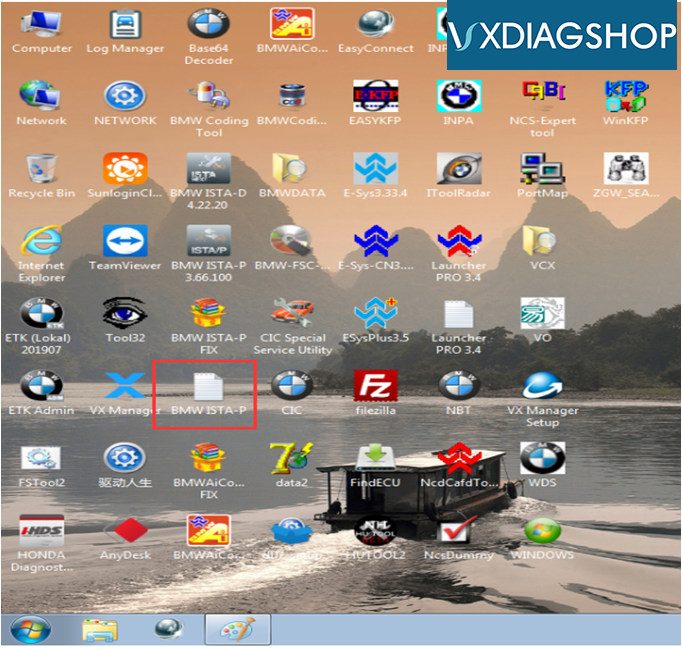
2). If fail to activate after enter the key, check the computer date/time setting.
Set date to current time or set time to 1 or 2 days later.
Free Download Ford IDS V118 and Mazda IDS V118 for VXDIAG
Both Ford IDS v118 and Mazda IDS V118 have been tested working with vxdiag vcx nano USB and WiFi without issue.
Version:
Ford IDS V118.01
Mazda IDS V118.01
Operating system: Window 7, Windows 10
Compatible device: vxdiag vcx nano for Ford/Mazda USB and WiFi, vxdiag vcx pro, vxdiag full , vcm2 clone (using vxdiag solution) etc
Language: English, German, French, Italian, Dutch, Spanish, Swedish, Finnish, Danish, Norwegian, Portuguese etc
Free download Ford/Mazda IDS V118 software
Ford IDS V118 download link:
https://mega.nz/#F!fcoVnYZT!jpEjr4HHXU5Ifg8Hm0xERg
Ford IDS V118 download link:
https://mega.nz/#F!fcoVnYZT!jpEjr4HHXU5Ifg8Hm0xERg
Mazda IDS V118 download link:
https://mega.nz/#F!bMg1ECzT!BjEMSq1TUvdgn2aT2CKTEg
https://mega.nz/#F!bMg1ECzT!BjEMSq1TUvdgn2aT2CKTEg
Ford/Mazda IDS programming crack patch download link (No need VMware):
https://mega.nz/#F!OV4RRC6B!seCWP6UCzOPWEDYlQxZ1iQ
https://mega.nz/#F!OV4RRC6B!seCWP6UCzOPWEDYlQxZ1iQ
Functions:
* Automatic vehicle recognition
* Read & Clear Diagnostic Trouble Codes (DTCs)
* Live Data-stream with Recording & Playback Functions for Main ECUs
* Guided Fault Finding
* New Software Re-flash for Existing ECUs
* Programming & Installation of new ECUs (PCM, ABS, Instrument Cluster, Air Bag, Fuel Pumps, etc.)
* Program New Keys (for additional fee)
* Injector Coding
* Set, Adjust or Remove Speed Governors
* DPF Regeneration
* Brake Bleeding
* Steering Angle Resets
* Automatic vehicle recognition
* Read & Clear Diagnostic Trouble Codes (DTCs)
* Live Data-stream with Recording & Playback Functions for Main ECUs
* Guided Fault Finding
* New Software Re-flash for Existing ECUs
* Programming & Installation of new ECUs (PCM, ABS, Instrument Cluster, Air Bag, Fuel Pumps, etc.)
* Program New Keys (for additional fee)
* Injector Coding
* Set, Adjust or Remove Speed Governors
* DPF Regeneration
* Brake Bleeding
* Steering Angle Resets
How to Install VXDIAG VCX NANO Ford IDS V117.01?
The latest version of vxdiag scanners (vcx nano ford, vxdiag full ,vxdiag mult tool etc) goes to V117.01. Here’s the installation guide of Ford IDS V117.
Same procedure goes to Mazda IDS V117.
Software version: IDS V117.01
Operating system: Windows 7 or above
Operating system: Windows 7 or above
Language: English, German, French, Italian, Dutch, Spanish, Swedish, Finnish, Danish, Norwegian, Portuguese etc
Free Download IDS V117 software fro VXDIAG
Ford IDS V117
Mazda IDS V117
Ford_Mazda IDS Patch (No need VMware)
https://mega.nz/#F!OV4RRC6B!seCWP6UCzOPWEDYlQxZ1iQ
https://mega.nz/#F!OV4RRC6B!seCWP6UCzOPWEDYlQxZ1iQ
Main steps:
1.Install Ford IDS V117 setup
2.Install VCI Software
3. Install VCI Manager(Ford)
4. Install VX Manager driver
5. Run software from Patch
Procedure:
1.Install Ford IDS 117 setup
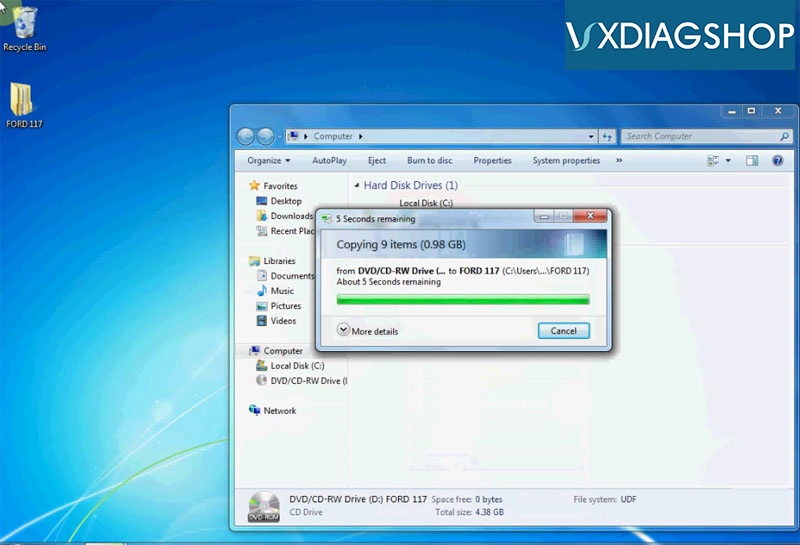
Copy software CD contents to desktop or directly download software above
Open C:/FORD117->FordInstall117->117
Open C:/FORD117->FordInstall117->117

Run IDS-117.01_Full setup

Select software language
If system prompts installing this software will require to restart computer, press Yes to continue

Install IDS InstallShield Wizard for IDS, press Next
Accept license agreement
Choose destination folder: C://
Press Install

System will prompt you available VCI firmware update, press OK to update
Configuring

Press Reboot to restart computer
2.Install VCI Software
Open C:/FORD117->FordInstall117->117

Install VCI_Software_1.0.0.0

Press Next

Finish installing VCI software
3. Install VCI Manager Ford

Run VCI Manager(Ford)19.04.28

Press Next

Install VCI Manager Ford success
4. Install VX Manager
Run VX Manager 1.6.2

Press Next

Select software program to install

Finish install VX Manager setup
5. Run IDS from Patch

Cut and paste IDSPatch to desktop
Remove IDS, VCI Manager, VCI Manager files to Recycle bin
Remove IDS, VCI Manager, VCI Manager files to Recycle bin

Run IDSPatch, select dealer type, enter dealer code: 123 and country, press tick icon to continue

Software is ready to use.
*Run IDS form patch but not VX Manager !!!