VXDIAG VCX SE BMW "A Fault Occurred on Execution"?
Problem:
I cannot connect my BMW 750il 2010 using the vxdiag vcx se BMW scanner. I have ISTA/D and E-sys to diagnostic car but no one works.
From VXdiag website I downloaded VX Manager.
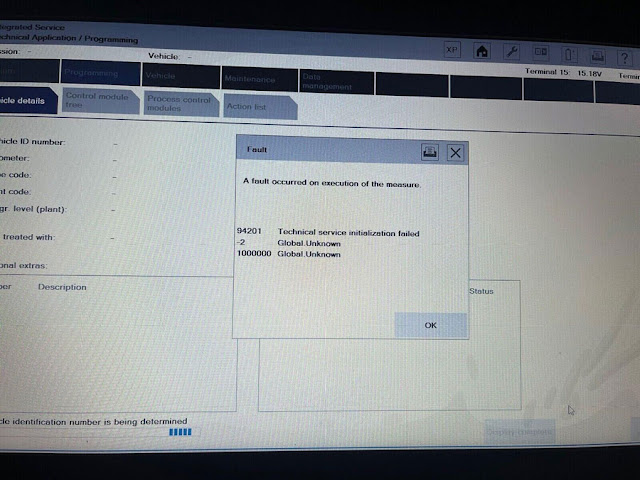
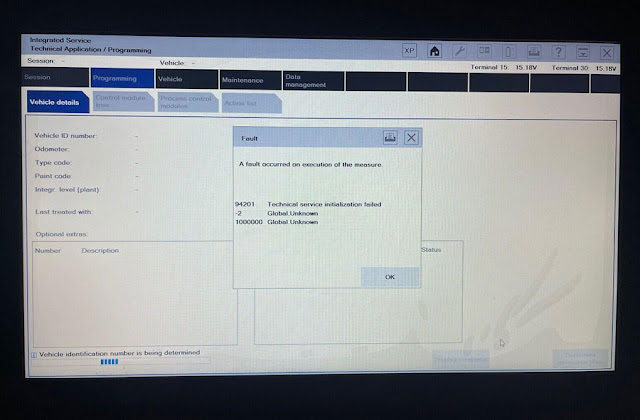
Solution:
To diagnose BMW F series models or use engineering software E-sys, you need to enable DoIP switch.
In VX Manager, press "DoIP Switch"-> BMW DoIP type-> DoIP ON
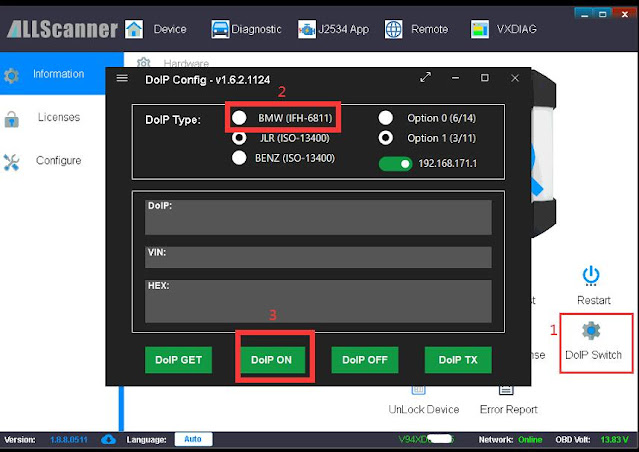
*You need to turn off windows firewall. Sometimes this wouldn't allow doip to start reading.
VXDIAG VCX SE vs C3 vs C4 Review in June 2023
Here comes the unbiased review of VXDIAG VCX SE Benz DoIP scanner on June 27th, 2023.
"I can recommend is the VXDIAG VCX SE for BENZ which also supports DOIP. I have been using this now for a while and it is really useful as it also works in C6 mode. That makes it useful for DTS Monaco to work with CBF and SMR-D files.
VXDIAG works perfect with Xentry XDOS (VXDIAG works in C6 mode for XDOS and in J2534 mode for Passthru) for cars after 2005-2006. I have one and use it regularly with Xentry and DTS for CBF and SMR-D. Also have the C3 and the C4. I prefer to use the VXDIAG above the C4… why? It just works! No boot time, no bulky interface and no annoying long cables.
You buy the VXDIAG SE for Benz only once and you renew the LICENSE for FREE at least every 6 months via the VXManager.
Never paid anything ever after the purchase.. so the "subscription service" part is totally not applicable.
I'm very happy with this device. I also have several C3 and 1x SdConnect, but
I always grab the VXDIAG for recent models because:
– No boot
time
– Works good via WiFi connection in C6 mode
– Small size, easy to fit
in the bag
– No bulky and stiff cables to carry around
– One interface to
work with Xentry & DTS in CBF and SMR-D
ONLY if you need to diagnose older cars before 2006, I recommend the C3 (use Xentry till 2014) or SDConnect as VXDIAG will not read all modules in the car.

VXDIAG VCX SE J2534 vs CarDaq Plus 3
Question:
Currently looking at the VXDIAG VCX SE or MULTI Tool for all brands including laptop - Have looked at the cardaq but don't know what to choose?
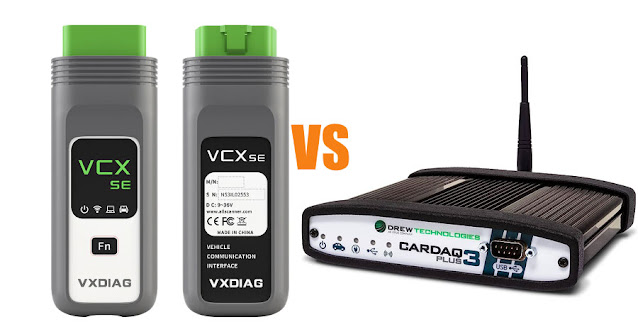
Here is the clue.
CarDag doesn't emulate original VCIs as VXDIAG does. VXDIAG emulates OEM VCIs - also supports J2534 like cardaq.
For example, Cardag cannot work with Ford IDS, only FJDS -FDRS. VXDIAG works with all IDS, Forscan, FJDS, FDRS.
CarDag cannot be replaced for a VCX SE or C6 VCI used in XDOS either. CarDag only works with xentry passthru version. With the Passthru and XPT devices you cannot work a priori on K lines, therefore older vehicles that use them will not be covered. VXDIAG works with both XDOS and Xentry Passthru.
CarDag device can be used as a simple Passthru device, it is not a 1:1 replacement for OEM VCI.
VXDIAG VCI will emulate following software
Toyota Techstream
Honda HDS
Benz Xentry
BMW ISTA
Subaru SSM3/SSM4
JLR SDD Pathfinder
Porsche PIWIS II/PIWIS III
Ford/Mazda IDS
Renault Clip
Volvo VIDA
GM GDS2/Tech2win
VAG ODIS
Vxdiagshop.com has software loaded to a laptop ready to go. We have a decent T440p with an i7 processor and 8GB ram, you could purchase an SSD and then upgrade the ram when you get it.
VXDIAG VCX SE Full with 2TB HDD Preloaded on T440P laptop
VXDIAG Multi Tool VCI with 2TB Full Brand HDD Preloaded on T440P laptop
VXDIAG VCX SE/Multi VCI also can be used as J2534 passthru for Hyundai/Kia J2534, Techstream official, FDRS, FJDS, Techline Connect SPS2, pcmflash, bitbox, alexflasher, gromcalc and much more.
Cardag Plus 3
Cardag Plus 3, openport 2.o, scanmatik 2 pro, Autel maxiFlash and Bosch MDI they are pretty much the same. Only that the Cardaq supports passthru-2 and DOIP and it's approved by all OEMs, but if you're on a budget you can get a good quality GM MDI clone (there's even a Bosch firmware that you can put on it) and that works fine for most applications.
VXDIAG VCX SE Renault No Sensor Detected Solution
Problem:
I recently got the Renault license activated on the vxdiag vcx se device. I followed instructions to install passthru driver and connect device. VX manager sees the device, but the software does not detect device, error no sensor detected. Any advice?
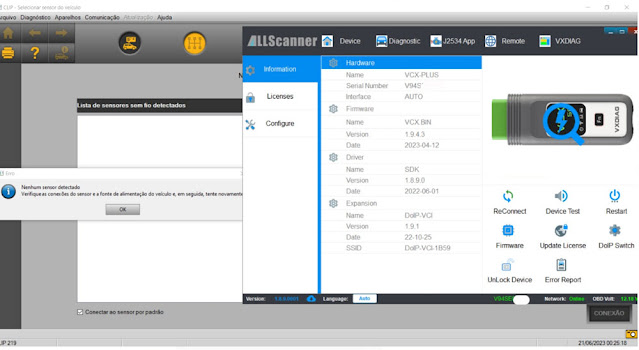
Solution:
First update license in vx manager.
Delete vx manager driver.
Install Renault VCI driver separately.
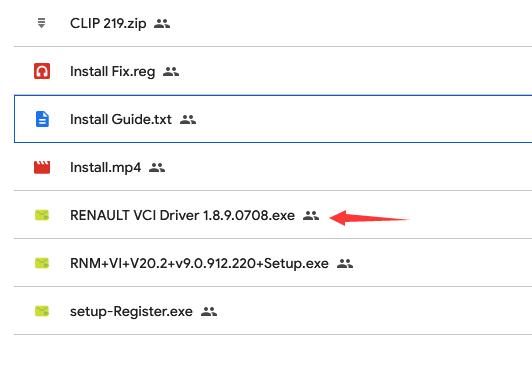
Renault software installation procedure:
1. Run Install Fix
2. Intall CLIP
3. Install Bosch Driver
4. Install
VCI Driver
5. Register CLIP
VXDIAG Renault Software and driver can be downloaded free here:
VXDIAG VCX NANO GM vs HP-Tuner
What is the difference between hptuner and vxdiag vcx nano for gm?

Functionality:
HPTuners is primarily a tuning and scanning software suite that allows you to read, write, and modify the engine control unit (ECU) of a vehicle. It offers comprehensive tuning options, data logging, and analysis tools. HP Tuners' VCM Suite software is the most comprehensive scanning, logging and calibration tool on the market.
On the other hand, VXDIAG VCX Nano is a hardware device that supports multiple diagnostic and programming software applications, including GM GDS2 (Global Diagnostic System) and Tech2Win, which are used for vehicle diagnostics, programming, and module flashing.
Software Integration:
HPTuners has its own proprietary software that integrates with its hardware interface. It provides extensive control over the tuning and modification of the ECU parameters. VXDIAG VCX Nano, on the other hand, is designed to work with various software applications, allowing you to access and utilize the official GM diagnostic and programming software. This means you can use the same software that GM technicians use for diagnostics and programming.
Coverage:
HPTuners primarily focuses on tuning capabilities and supports a wide range of GM vehicles. It allows you to make modifications to the ECU parameters to optimize engine performance. VXDIAG VCX Nano, with its GM GDS2 and Tech2Win software support, offers comprehensive diagnostics and programming capabilities for GM vehicles. It covers a broader range of functions beyond just tuning, including module programming, key programming, and diagnostics.
Hardware:
HPTuners requires a specific hardware interface (HP Tuners MPVI2 or MPVI3 versions) that connects to the vehicle's OBD-II port. VXDIAG VCX Nano is a compact hardware device that connects to the vehicle via the OBD-II port and acts as a bridge between the vehicle and the diagnostic software running on a computer.
In Sum:
VXDIAG can be used for diagnosis and programming. But hptuner for tuning.
You can do a lot of functions with vxdiag vcx nano that the hptuners module cannot.
It will access BCM, TCM, CAN Bus, clear and reset sensor, perform online programming with sps2 etc, etc.
HP Tuner cannot program a replacement PCM/BCM module, you will need GM SPS/Techline Connect. But if you need to program an already working functional PCM then yes you can do modifications to it.