VXDIAG Benz WIS EPC VMWare Error 462 Solution
Problem:
Failed to run VXDIAG VCX SE Benz EPC and WIS software on the desktop.
When attempting to run the EPC (Electronic Parts Catalog) software, an error message appears: "Error 462: EWS session token has expired." Additionally, the WIS (Workshop Information System) software fails to run on VMware.
Any solution?

Solution:
Run WIS_WEB software instead from EPC and WIS icon.
Make sure your laptop VM-support is enabled. Go to Bios and enable Secure Virtual Machine (SVM). Then run WIS again.

It should be working fine.

If you are able to start WIS but no show wiring diagram, new patch will fix it.
VXDIAG Update VAG 6154 Driver for ODIS V24
Great news! The VXDIAG VCX SE 6154 and VCX NANO 6154 have released a new driver update to support the latest ODIS Service 24.x software.
2025.02.27 v3.4.2.250227
What's New:
-
Update: Added driver support for the new ODIS 24.x software version.
-
Fix: Resolved an issue causing DoIP diagnostic crashes in the latest software.

Update VW ODIS 6154 driver in VX Manager.


VXDIAG Benz Driver "Xentry Diagnosis Software Not Installed" Solution
Problem:
Tried using the VXDIAG VCX SE Benz with third-party Benz Xentry software. During the setup, I attempted to install the Benz C6 driver in the VX Manager, but the installation failed. The error message indicated that the Xentry diagnosis software was not installed. Any ideas on how to fix this?

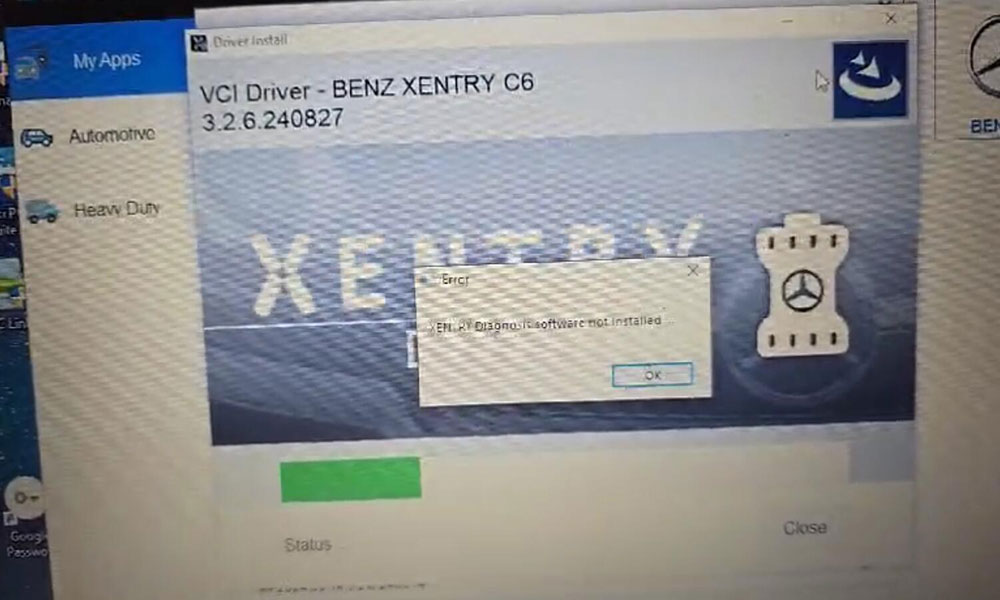

Solution:
After a TeamViewer session, we discovered that
the original Bosch driver was
missing. Once the Bosch driver was installed, the issue
was resolved, and the setup worked correctly.


Steps to Fix:
- Ensure the original Bosch driver is installed.
- Retry installing the Benz C6 driver in the VX Manager.
- The setup should now work without any issues.

How to Solve VXDIAG Volvo VIDA 2014D Login Failed Problem?
Problem:
I tried setting up the VXDIAG
VCX SE with Volvo VIDA 2014D software on Windows 10. After
running VIDA from the patch, I was unable to log in. I reinstalled the software,
but the issue persisted. Any ideas on how to resolve this?

Solution:
After a TeamViewer session with an engineer from Vxdiagshop.com, it was discovered that the wrong patch was being used.
Steps to Fix:
- Download the 2014A_2033.exe patch.
- Run the VIDA software using this patch.
- The issue should now be resolved, and you should be able to log in successfully.

VXDIAG ODIS 24.3.2 No VCI Selection Solution
Problem:
Tried to use VXDIAG VCX SE 6154 scanner with the new ODIS service software version 24.3.2. VX Manager detected the interface but no VCI selection in ODIS software.
Does vxdiag work with odis 24.3.2?

Solution:
The vxdiag vcx se is compatible with 24.3.2 service software.
1. Update VW driver. Uninstall VW ODIS 6154 and reinstall driver in vx manager.

2. Install ODIS PDU driver.
The original 6154 driver is lost or hacked by virus.
Contact www.vxdiagshop.com to download original ODIS-S PDU driver (VW D-PDU API 64bit).
Double-click to install the VW D-PDU API 64bit driver setup. Choose the destination location as C:/Program Files/VW_PDUAPI_OS folder and wait until the setup installation is finished.

It should be fine. Run ODIS-S software again. Select VCI type as VAS 6154.