VXDIAG VCX NANO, Mini VCI or Openport for Lexus
I just finished up doing a transmission swap on my Lexus and got interested in the various OBD programmers that exist in the process.
I will be covering & researching primarily devices that cover cars I own or may work on, so this will not be comprehensive, nor is it meant to be. This post will be updated over time with new information.
Devices I have:
* Mini VCI: These are knockoffs of an Xhorse tool. Unfortunately, the original company no longer exists, as it was driven to bankruptcy by Chinese clones.
Supports: Toyota/Techstream
Tech: FT232RL or FT232RQ – same chip, different packaging. Very likely to be a clone chip.
There are several versions of the cable floating around, but there are two major distinctions:
V1.4: Most common. Does not support active tests. Can't program TPMS on newer cars. Cannot be updated. Cost: $20-50
V2.0: Supports active tests. Difficult to find. Many devices that claim to be V2.0 are actually just scams. Cost: $50-$100
Personal experience: Works OK. Sometimes drops connection for no reason. Getting the drivers to work on x64 or windows 10+ can be difficult, but there are plenty of VM images floating around that already have everything set up to go. Good enough for reading/clearing codes and diagnostics. Don't have to deal with credits or unlocks or any of that.
* VXDIAG VCX NANO Toyota Techstream: Works with both WIFI and USB so you aren't tethered to the car while working.
Supports: Different flavors for different brands, version I have is Toyota/techstream only.
Tech: STM32F4
Cost: $100 for the wifi version
Personal experience: Allscanner requires you to connect to the internet every 60 days to update your license, and always takes 3-4 tries to update before it will settle down. Once you get past that though it's smooth sailing. Wifi works well, signal is so strong I can pick it up two rooms away. USB works well too. Works with techstream perfectly. Live data, active tests, etc all work. Much faster and more reliable than my VCI cable.
Devices I am researching but have not tried:
* Mongoose: Officially supported cable for Toyota, but is $495. Clone cables do exist but I haven't looked into them. They may actually be a better solution than mini VCI cables.
* Tactrix Openport 2.0: $169. Clones exist for $20ish but will get fried if they get a firmware update. Requires replacement of some resistors on the board if you get the clone, but supposedly can be updated to the latest firmware then. Reports on compatibility are varied as they seem to be used primarily in the Subaru world, but most techstream functions should work.
VXDIAG Subaru Forester 2009 DPF Regen Success
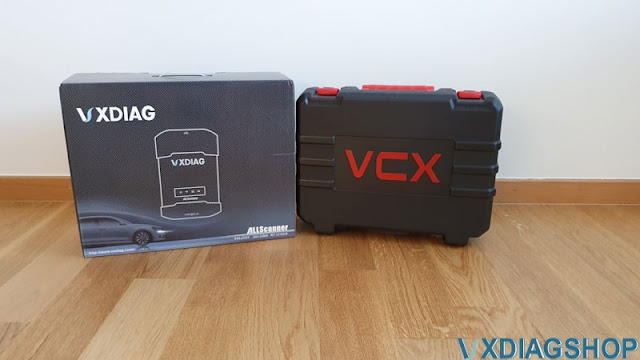
It is a Subaru Forester 2.0 Diesel (SHJ) 2009. The customer got the vxdiag subaru diagnostic box on this car. The cheap ssm cable works till 2009. This time he decided to take a chance and ordered a diagnostic box from VXDIAG Subaru V2022.01, Wi-Fi, for SUBARU SSM-III, 4. It works with Subaru Select Monitor 3.4 (SSM3, SSM4). This is the software that Subaru Dealer uses. You can read errors, flash, and most importantly, regen the DPF filter (relevant for those who have diesel versions).

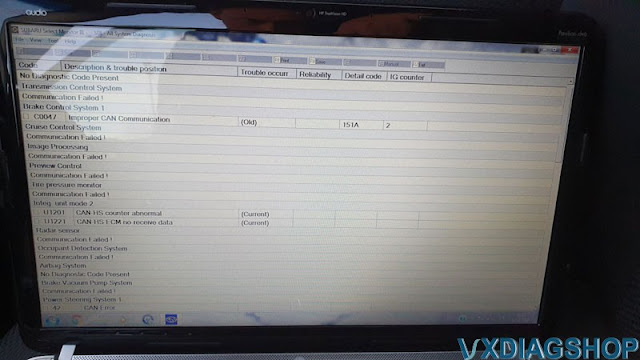
And now for the mistakes. Errors on the CAN bus. Apparently, there is a problem which need to figure out later.
Now, the most important part. DPF regeneration!


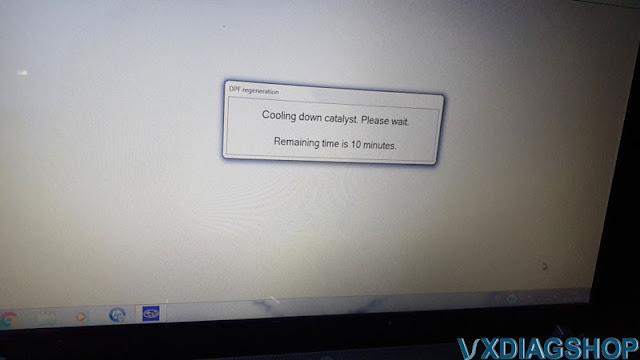
The car flew like a rocket.
Autel vs Launch X431 vs Openport vs VXDIAG Subaru
Which obd2 diagnostic scanner to link up with your Subaru SJ Forester's? For example a 2015 2.5i-L CVT. Check which scanner will do maintenance and access their ECU/TCUs.
Autel MK808:
When I got it, it couldn't do any DPF
functions whatsoever. It still can't scan and detect my VIN, nor can it reset
the service/oil dilution. So essentially, its an expensive battery, that I take
out and charge every now and again.
Another trap. The Software and support
licence runs out. So "no soup for you".
$600 is a lot to pay, if its just for
your car. You could probably buy a new DPF for that, or three cordierite
ones.
Autel AP200:
Now I gave Autel ap200 i think its called.
Also promises to do everything. I have tried to do injector learning an to my
surprise it worked. The app kinda crashed, but function was completed
successfully. There is also a bug, i think, where before the function it asks if
i have replaced an injector and two options -ok and cancel. Cancel does what you
expect it to do, but pressing ok, it clears out "distance since injector
replaced" and performs injector learning procedure. So it kinda works. On DPF
regen function there is also a question – if i have replaced my dpf and also ok
and cancel. Haven't tried to go further.
Launch X431 CRP429
I have tried Launch crp479 ($300) that
promised to do everything on subaru. But it didn't. I did all updates, but still
no luck.
Openport:
SSM4 starts up fine, I enter my VIN, however there appears to be no connectivity from the OBD port, no readings, no signal, nothing. After some research, it works.
It is good for re-flashing but does not communicate with the OEM software.
VXDIAG
Subaru SSM3/SSM4
From vxdiagshop.com for $250 you can get
VXdiag, which is the only aftermarket tool that supports dealer diagnosic
software SSM3. I go with that. Supposedly this works with the upto the 09
models. This would be awesome if it does.
I got the VXDIAG Subaru. It works fine with the SSMIII software included although there's limited modules you can access on old 2004 FSTI (it's K-Line which is pre-canbus), i've added transponders to the immobiliser and general engine ECU logging and fault clearing. Should be a much more useful tool on the later full canbus cars.
In summary:
For one cheap Cable /Interface, you can try TACTRIX OpenPort J2534.
Professional Jobs check the VXDIAG SUBARU Diagnostic Tool that works SSM3 and SSM4 till 2020 Year.
VXDIAG Tech2Win GDS2 Review on Win11
VXDIAG VCX NANO GM recent reviews.
"I'm writing to you from 2022. I just set this up on a Windows 11 (!!) laptop. Be prepared to spend some time with it.
I followed the video. I had one issue. The files in the USB drive for the 2nd setup didn't quite match the video. I googled "VXDIAG Download", which took me to their website. I downloaded the latest installer, and that was it. You have to do all kinds of playing with the drivers and such to get it to work and not for the novice user.
I took off 1 star mostly because the USB cable it came with was wound so tight that it now connects/disconnects if I bump it (not that it falls out, it but my laptop loses connectivity).
I tested this on two vehicles. A 2006 Pontiac Montana SV6 and a 2000 Chevy Silverado 2500. Keep in mind that the internal menu's of a Tech II won't always have the names you are used to. For example my van was a "Pontiac APV U Body".
The commands available for newer vehicles (2006 vs 2000) are pretty cool. I specifically bought this to do ABS speed sensor testing, but it's fun to play around with. Much cheaper than a Tech 2.
Firmware Reset Button of VXDIAG VCI V52XP**?
Question:
I try to reset the vxdiag vcx plus multi tool vci firmware coz it failed to update firmware in vx manager. But i cannot find the reset button. Where can i find it? It is this one?

VXDIAGSHOP.COM solution:
This board is old type. These VCI were produced before year 2018. They start with the serail number V52XP** (usually in red color). These VCIs don't have DoIP feature and thus don't have a Reset button.
All new VXDIAG VCX Plus VCI has a DoIP reset button now.
Check how to reset VCI firmware
http://blog.vxdiagshop.com/2019/04/26/reset-vxdiag-benz-c6-vcx-doip-firmware/